
Benefits
ALL available Benefits information can be found by ⬇️ scrolling down ⬇️ and clicking into the documents below.
Cigna and EAP Tools Webinar
Hey Team!
Get ready to level up your benefits game! 🎉
We’re diving into all the amazing perks our health and welfare vendors have to offer.
Think:
💥 How to view your medical claims
💥 Score your ID card in seconds
💥 Find top-notch providers and get $$ for seeing them
💥 Mental wellness resources to support YOU and your people
💥 Financial support tips (yes, please!)
💥 And soooo much more…
It’s time to get the inside scoop on how your benefits can actually work for you.
401(k) Educational Video
If you are new to investing in a 401(k) Plan or want a refresher course, take some time and review this educational video by Two West advisor Amber Kanzenbach, CFP. Amber shares information about the Rally House 401(k) plan and the benefits of investing early. Two West helps manage the Rally House retirement plan to ensure we are compliant and offer solid investments to our employees. Two West also provides complimentary retirement and financial planning services to help you reach your goals – one-on-one financial coaching, financial education workshops and a five-minute financial plan.
Both full-time and part-time team members are eligible to participate in the 401(k) plan on the first of the following quarter after six months of employment.
Rally House currently matches 100% of the first 3% of your 401(k) contribution and then 50% of your next 2% contribution. Additionally, 100% of your 401(k) is vested immediately.
Garner
Mutual of Omaha
Predictive Index
PI Cognitive Assessment
FUN FACT: Did you know 🧠Cognitive ability is one of the strongest predictors of success in retail roles? That is why a Cognitive Assessment is included with our Predictive Index process.
🔻Why is this needed?
Great hiring looks at four areas: behavior, experience, skills, and cognitive ability. Adding this step helps us…
- Hire smarter and more accurately
- Speed up training
- Build stronger, higher-performing teams
- Improves retention and long-term success
Bottom Line: you have four points of information to consider as you Hire the Best and find the right people, in the right seat, who can grow with Rally House.
🔻The Candidate Journey
-
Who receives the Cognitive Assessment?
- Store Manager candidates
- MULs candidates
- Internal candidates for SM position
- Cognitive Assessment in action.
- Takes 12 minutes, 50 questions
- Measures how fast someone learns, adapts, and solves problems
- Not a stand alone results. Use alongside of the interview and applicants resume/experience.
🔻The Process
-
When sending a PI to a Store Manager or District Manager candidate:
- Select both the Behavioral and Cognitive Assessments.

- Candidates should complete both assessments in a distraction-free setting, using a computer or tablet (not a phone or small screen), and without help from others
- Select both the Behavioral and Cognitive Assessments.
-
Review the results and think holistically, comparing the four points of data (PI Behavioral, PI Cognitive, Experience/Resume, Interviews)
-
✅Green flag meets all four points of data— no questions remain, just a second interview.
-
⚠️ Yellow flag indicates concerns that require further clarity; communicate these concerns to the next interviewer in your candidate summary.
-
🚩Red flag signifies a combination of too many misses or concerns among the four points of data.
-
| Results | Four Points of Data | |
|---|---|---|
 |
✅PI Behavioral Job Target | ✅Experience |
✅PI Cognitive Job Target 200+
|
✅Interviews | |
Ultimately, you are responsible for Hiring the Best, Developing Successful People, and Showing People You Care. This all starts with finding the right candidate.
📢Reach out to Recruiting for support!
Predictive Index Overview Video
Personal Development Resources
Leadership Development Workshops
Misc. Workshops
Ted Talks
OSHA
Follow the process below whenever an OSHA complaint is received at any store location or at the corporate office. It is critical that all complaints are handled immediately and routed correctly to ensure a timely and compliant response.
OSHA Complaint Process
- Forward the Complaint Immediately
- All OSHA complaints must be forwarded upon receipt to:
- Benefits@rallyhouse.com
- Dan.Zmijewski@rallyhouse.com (General Counsel)
- All OSHA complaints must be forwarded upon receipt to:
- Coordination of Response
- Benefits/Compliance will coordinate all required actions and responses with General Counsel, Retail Operations, and any other relevant departments, specific to the complaint.
- Communication to Leadership
- Benefits/Compliance will provide initial and ongoing updates regarding the complaint, actions scheduled or taken, and findings will be sent to store-level leaders and corporate management to include:
- Head Coach
- District Manager
- Regional Director
- General Counsel
- Sr. Vice President of Retail Operations
- Vice President of HR
- Benefits/Compliance will provide initial and ongoing updates regarding the complaint, actions scheduled or taken, and findings will be sent to store-level leaders and corporate management to include:
- Follow-Up After Inspection
- If additional actions are required following an OSHA inspection, Benefits/Compliance will coordinate with the appropriate parties and track progress until all requirements are fully met.
- Final Documentation
- Benefits/Compliance will communicate final findings to all listed stakeholders and will maintain the official records of the complaint and all related actions.
All Team Members need to be familiar with this process so we can respond promptly and appropriately to any OSHA inquiries.
Employee Relations
Employee Relations: Manager Training Modules & Videos
Inquires about Coaching, Counseling, Conduct and Performance Management? Reach out the employeerelations@rallyhouse.com or open a NetSuite Case for Employee Relations
|
Module 1 Corrective Action 🔗 Click & Control version Corrective Action with voice instruction. Video version ⬇️ |
 |
Inappropriate Conduct Checklist, (Harassing Behavior Check)

Performance Management
Corrective Action Plan Guide (Workday)


Performance Improvement Plan (PIP)
A PIP is a plan used when an employee is not meeting job expectations, and they need clear steps, support, and a deadline to improve how they perform their job duties.
To start a Performance Improvement Plan, follow the 🔗 PIP Implementation Process
Once the PIP creation and meeting process is complete, the supervisor and team member need to complete STEP 3 and acknowledge the document in Workday to send to completion.

After Step 3 is the PIP Follow-up where you need to review the submitted plan to track progress.
✏Schedule bi-weekly meetings with your team member to ensure you are both aligned with the progress of the PIP
✏Use the resource 🔗PIP: Review Submitted Plan on how to add notes to the development items during your bi-weekly meetings
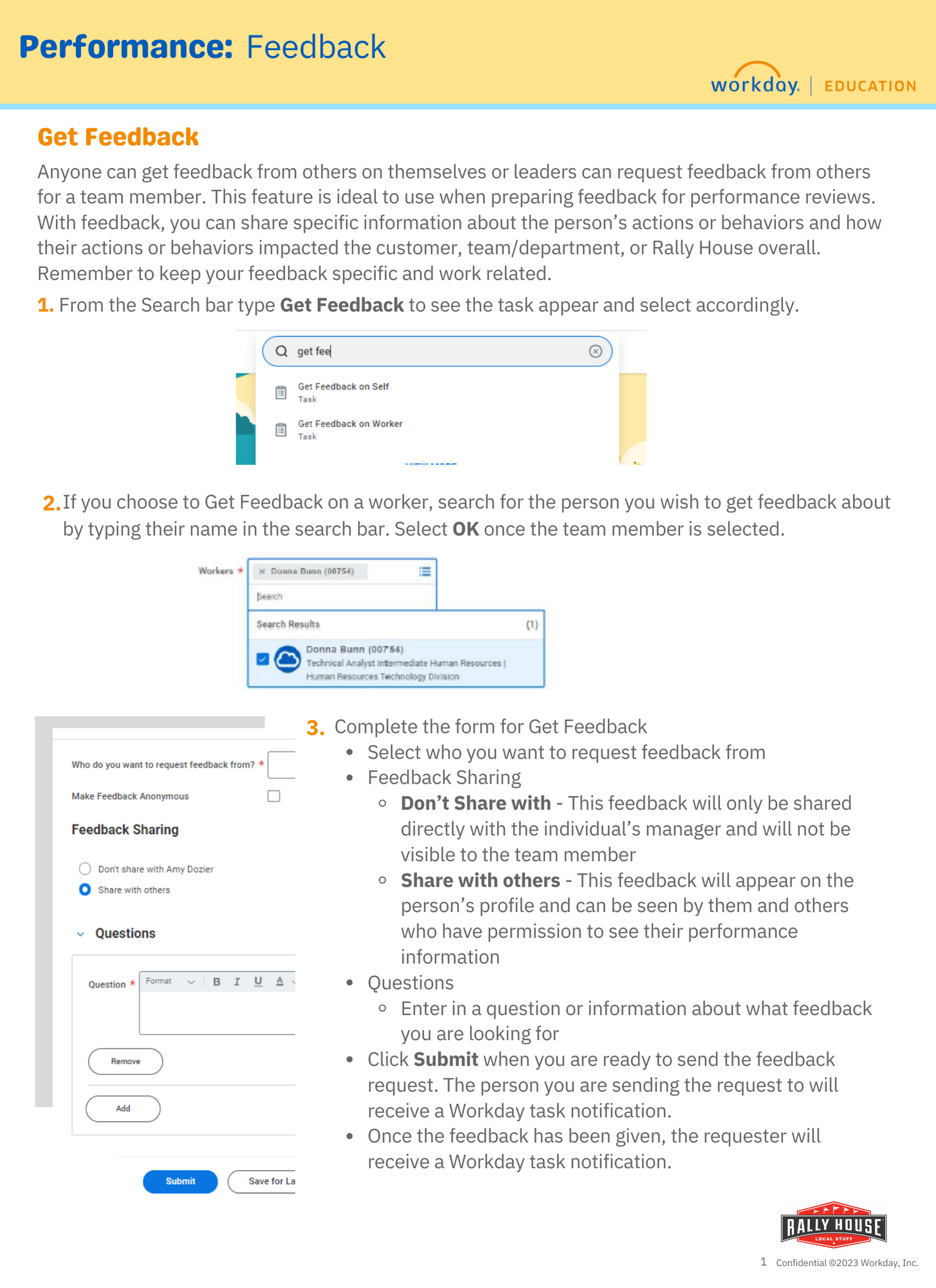
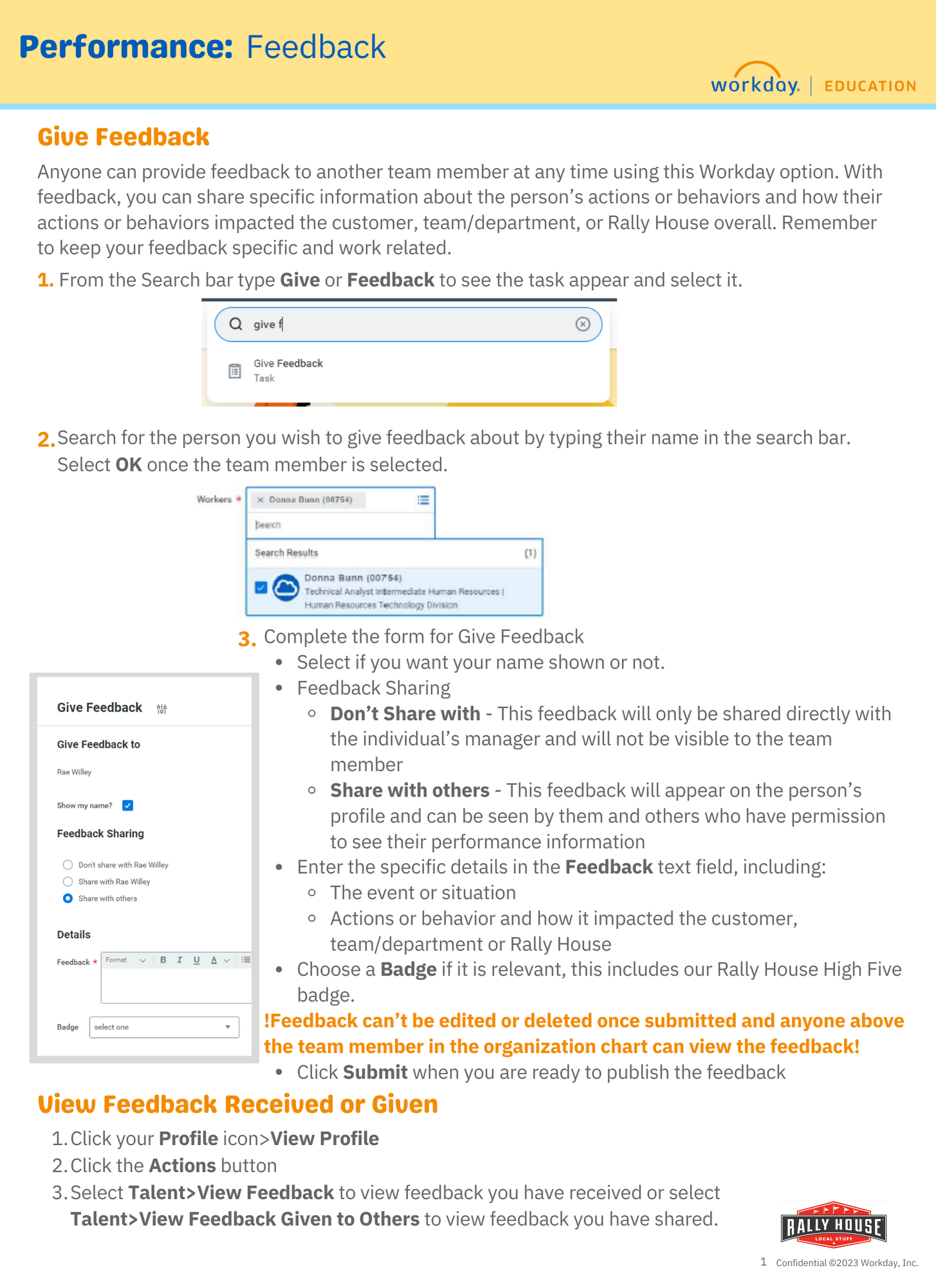
Quarterly Talent Meetings


Rally House Dress Code FAQ
Dress Code FAQ
🔽If I want to purchase more T-shirts than I am being provided with, is there a discount?
Additional T-shirts and crew necks carried in stores are available for employee purchase at 40% off.
🔽Is there a big and tall option?
Employees can purchase big and tall options online at rallyhouse.com. Employees that need their free dress code items that need a big and tall option should open a support case in NetSuite.
Options such as polos and ¼ zips will be orderable online at rallyhouse.com. These will be available as drop ship items. Shipping must be paid on these items by the employee as they are not the mandatory shirt that has to be worn, but an option for purchase.
🔽How can I locate the online options?
Type “Employee” in the search bar on the website. This will populate the items that are dress code items. These items are marked down to their 40% off price already! Shipping must be paid by the employee making the purchase.
Employees can wear their anniversary gift that is company branded! Employees that have old RALLY Pennant t-shirts can also wear these t-shirts. A photo of the RALLY pennant t-shirt can be seen in the Retail Handbook.
The Retail Handbook explicit prohibits any political propaganda, apparel, etc. This includes hats, shirts, or any other apparel item.
While we do not anticipate this occurring, in the instance that it does, the employee can wear a solid colored black or red shirt to work.
Rally House branded tops are not to be altered or cropped.
Yes!
Please refer to the Retail Handbook.
Employee Lanyards and Aprons
- The company apron must be the top layer (over any t-shirt, polo, dress shirt, sweatshirt, etc.) and contain a pen, notepad, company phone (if available), dust cloth and wax paper.
- Always wear company issued name badge and lanyard while on the clock.
- Employee lanyards do not go home with the employee at the end of their shift.
- Employee lanyards and aprons are stored in the backroom lanyard and apron organizer.
- This ensures that all employees have their lanyard and apron for each shift.
- The lanyard and apron organizer is most often placed on the back side of the backroom door.
- Each employee should have their own slot.

Uniform (Dress Code) Issuance Guidelines
- New Hires are given the following based on their position. However, all items are not given to the team member on their first shift.
- Part Time Team Members: 1 tee on first shift, 1 tee on second shift
- Full Time Team Members: 2 tees on first shift, 1 tee and 1 crew neck on second shift
- Team members who transfer outside their market to work in a new store are eligible for the following replacements:
- Part Time Team Members – 2 tees will be eligible for replacement
- Full Time Team Members – 2 tees and 1 crew neck will be eligible for replacement
- Each 6 month anniversary for a team member, they are eligible for an additional t-shirt.
- This is to be redeemed during the month of the anniversary.
- There will not be a report that flags for a tee to be given to a team member.
- These items are rang as free items. Use the below barcode to discount the items.
- All items for dress code must be rang at the POS under the team member’s customer profile.

- All items for dress code must be rang at the POS under the team member’s customer profile.
- If a team member would like additional items outside of the above outlines, they can be purchased at 40% off.
- If the item that the team member is ordering online, the team member must pay shipping.
Rally House Handbook
Reasonable Suspicion Drug Testing
Onboarding
SCROLL ⬇️to review the Onboarding process. Continue to SCROLL ⬇️ for all information, including the complete list of tasks all New Team Members will need to complete.

Onboarding Status Summary Report
The Onboarding Status Summary Report displays incomplete or in progress onboarding. Onboarding for team members must be completed within 3 days of their first day working. To follow up with team members in completing their onboarding tasks, Managers can run the Onboarding Status Summary report in Workday for a list of incomplete and complete tasks.

Work permits for Ohio
Information on obtaining working papers for the state of Ohio. ⬇ Scroll down.
Example for a minor work permit in Ohio

Form I-9 Process (eVerify in Workday)
⬇️Scroll down for all printable resources ⬇️
Important Reminders for Onboarding and I-9 Compliance
- Timing: Onboarding, including completion of the I-9, should be done within the team member’s first hour or first shift.
- Their hire date should also be accurately reflected in Workday
- Changes to the hire date, OR any delay in verifying documents should be communicated to onboarding@rallyhouse.com
- 🎯Accuracy: it is critical to enter all required and accurate information into the I-9 on the first day of employment to ensure the verification process is completed within the three-day deadline set by the federal government.
- ✅Completion: Once the I-9 is completed in Workday, your portion of the process is finished.
- Changes to the hire date, OR any delay in verifying documents should be communicated to onboarding@rallyhouse.com
⚠️Mis-match: A mis-match means the information in EVerify does not match the government records, usually due to a typo or data discrepancy. A Workday task will be sent to the managers for correction is a mis-match occurs.
Need Help or Have Questions?
📢contact the Onboarding Team onboarding@rallyhouse.com
Support is available as needed to assist!
Payroll
Payroll: click for Training Modules & Resources
Inquires on Getting Started information or Payroll Modules? Reach out to payroll@rallyhouse.com or open a Netsuite case to Payroll
Modules have two learning options and are organized by category. Each category will have relevant BPs included below the training Module section.
- 📺Watch the video version for the full overview of the process.
- 👆Click and control presentation = A voice guided presentation that allows you to control the learning pace by clicking an instructional slide at a time to better apply the steps as you go.
- Both versions contain the same content and provide learners with a choice.
Module 1 Request Off Mobile
🔗M1 Request Off Click to Control version
Video version
Module 1 Request Off Desktop
Legion InstantPay FAQ
Legion InstantPay FAQ
One of the benefits of working with Rally House is access to Legion InstantPay, which allows you to receive a portion of your earned wages the same day you work. This third-party service acts as a direct deposit through Workday, but it reads your hours worked to provide immediate access to your funds.
Please note: If you utilize Legion InstantPay please use the in-app chat feature for any payment or account related issues.
- Why haven’t I received my funds?
- Check your Workday pay slip first to confirm how you were paid. If the payment method is Legion InstantPay and the last four digits are your Wagestream Account Number, refer to the pay statement sent by Legion InstantPay to verify the funds you received. The amount from Legion InstantPay may differ from your Workday net pay due to fees or streams deducted.
- Verify your account information is correct in Legion InstantPay.
- If you have streamed wages during the period, funds may be delayed on Friday due to additional processing by the service.
- If the above steps do not resolve the issue, use the Legion InstantPay in-app chat feature for assistance.
Note: If you opted out of the service recently, refer to question 6.
- Why can’t I change my direct deposit on Workday?
- If you are enrolled in Legion InstantPay, you cannot update your payment elections in Workday until you fully “opt out” of the service.
- To Opt out- on the Legion app, go to InstantPay and select Opt Out.
- If this option is not visible, contact support using the Legion InstantPay in-app chat feature and request to opt out, providing your employee ID.
- If you are enrolled in Legion InstantPay, you cannot update your payment elections in Workday until you fully “opt out” of the service.
- How do I update my account information in Legion InstantPay?
- You can update your account information directly in the Legion InstantPay app.
- From the Dashboard within Legion InstantPay, please tap on “Accounts”
- Tap on the current Linked Bank Account Details
- Tap “Replace”
- Follow the Prompts to enter your new bank account details.
- If you have any issues updating, use the Legion InstantPay in-app chat feature to request assistance.
- If your direct deposit information is incorrect when payroll is completed, Legion InstantPay will contact you to correct it. If you don’t respond, the funds may be returned to Payroll, and there could be a delay in reissuing those funds.
- You can update your account information directly in the Legion InstantPay app.
- Why did I receive less money than what is on my Workday payslip?
- Check your Legion InstantPay statement for details on any streams, fees, and your net pay.
- If there are discrepancies, use the Legion InstantPay in-app chat feature to address the issue.
- Why is my InstantPay account paused or disabled?
- Legion can pause your account if they have not received any direct deposit in the last 30 days
- You will need to unpause your account in the app if this occurs
- You may also have an outstanding balance, and your most recent deposit was not enough to cover the amount
- For additional assistance, use the Legion InstantPay in-app chat feature
- Legion can pause your account if they have not received any direct deposit in the last 30 days
- Want to Opt-out of Legion InstantPay?
- Head to the Settings (Gear Icon) located at the bottom of the Home Page
- Tap Account Settings
- Tap Close and Terminate account.
- access this link for more information and further instruction for after you have initiated the opt out procress. How Do I Cancel or Opt Out of Legion Instant Pay?
Additional Resources:
2. Refer to additional Zipline Resources: https://rallyhouse.retailzipline.com/library/resources/2105ff2e-instant-pay
3. Refer to Legion Help Desk
Payroll FAQ
Commonly asked Payroll Questions on Pay Day
- Where is my paycheck?
- View pay slip in Workday to see how you if/how you were paid.
- Log in to Workday
- Go to Apps–> Pay–> Pay History (Click check date) –> Payment Information.
- Direct Deposit-see item 3 below for information
- Paper Check:
- Verify address is correct in Workday and allow 14 days for your paper check to arrive.
- Incorrect address-update in Workday and ask direct manager to contact Payroll team.payroll@rallyhouse.com to stop payment on the check.
- View pay slip in Workday to see how you if/how you were paid.
- I enrolled in Legion InstantPay. Where is my direct deposit?
- Review pay statement that was sent from Legion InstantPay service which is separate from the pay slip you have in Workday.
- Use the Help Center within Legion InstantPay for helpful content and FAQs.
- Use the in app chat feature in Legion to contact the support team and wait for their response. Payroll is unable to troubleshoot issues with Legion InstantPay.
- Please note: If you streamed wages during the pay period, there will be a delay of a couple of hours on pay day. Review your detailed pay statement from Legion InstantPay to confirm the amount you should receive. Use their in app chat feature for any support needs.
- Review pay statement that was sent from Legion InstantPay service which is separate from the pay slip you have in Workday.
- I set up direct deposit, but I did not receive anything in my account.
- This is likely a result of incorrect account information.
- Login to Workday
- Verify your payslip shows direct deposit as the payment method
- Verify your account information in Workday
- Contact your bank to inquire about the deposit. if no deposit is located, you will need to wait until the week following for the funds to be resent to your account.
- Off Cycle checks for returned direct deposits will be processed on Thursday and will pay out Thursday or Friday depending on your bank.
- This is likely a result of incorrect account information.
- I set up direct deposit, but my pay slip says I am receiving a check.
- Payment Election is still set to Check in Workday.
- Login to Workday to verify that the account you set up is set up as a payment election. Setting up direct deposit in Workday is a two step process. Instructions on setting up your payment elections can be found in the Payroll folder in the Zipline library.
- Payment elections must be set up in Workday prior to 10:30 a.m. CST on the Wednesday of payroll week.
- If you have Legion InstantPay you must update your information via the Legion InstantPay app, not Workday!
- To discontinue Legion InstantPay, you need to “Opt Out” through Legion InstantPay. As long as you are enrolled, Legion will continue to override any payment election updates you make in Workday.
- Payment Election is still set to Check in Workday.
- Discrepancies with paychecks:
-
- Missed punches – payroll does not enter missed punches for employees. Please email your manager with any missed punches to be entered in Legion. These will come through on our pay file on the next payroll as “retro pay”.
- Per policy, Payroll does not issue off cycle payments for missed punches. It is the employee and manager’s responsibility to ensure timecards are accurate and approved by the deadline of 12pm on the Monday of payroll week.
Fair Workweek Laws
🔽 Scroll Down for All Resources 🔽
The purpose of these laws is to support team members in maintaining their work-life balance, meeting their family’s needs and overall satisfaction with their workplace and minimize unpredictable schedules.
Fair Workweek laws offer protection for employees and provide employers with guidelines for fair scheduling practices. Other benefits of the law include:
- Good faith estimates of hours upon hire.
- Minimum break times between shifts.
- Penalties for “Clopening” shifts.
- Offering new shifts to current employees before new hires.
- Prevent late schedule changes or pay “Predictability Pay”.
- More detailed scheduling records.
Employees and managers need to be educated on their role to ensure they are compliant and protected.
Chicago, IL:

Philadelphia, PA:

Fair Workweek Laws Process

New York Spread of Hours
🔽 Scroll Down for All Resources 🔽
Spread of Hours means if your workday lasts more than 10 hours you may be entitled to one additional hour of pay at New York’s minimum wage rate.
This law was put into place to:
- Allow employees more time to themselves to take care of their needs outside of work.
- To discourage employers from scheduling double shifts with long break times in between.
- New York believes that if an employee’s workday does exceed 10 hours, then they should be compensated for the extra time even if they are not working.
Premium pay for Split Shift or Spread of Hours does not count towards FLSA Overtime calculations.
New York Spread of Hours Process

Additional visual aids to understand how premiums are calculated:


MN Paid Leave

Documents
Recruiting
Hiring Process in Workday and Phenom
Utilize this Hiring Process checklist to keep yourself on track through the hiring process. ⬇️Scroll down for printable PDF.

Start Job Requisitions in Workday
Corporate Hiring Process
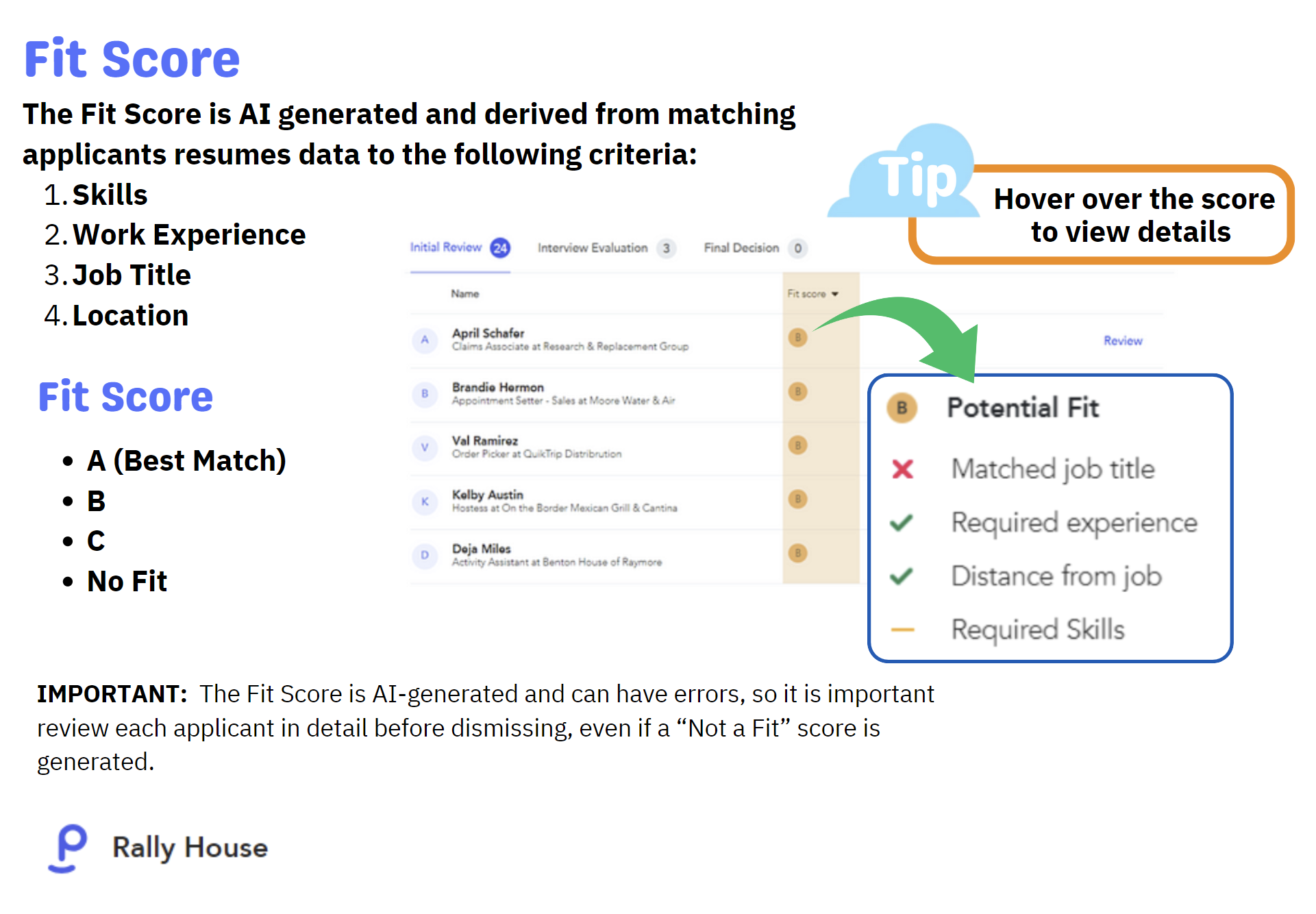
Phenom: Review Candidates
Offers in Workday and Approval
📲Please ensure you call the candidate once you send the extended offer!
Promotions, Job Changes and Internal Applications in Workday
Interview Process
Outlook Calendar Interview Blocks
All stores should allocate availability on their Outlook calendar for interviews to take place in the mornings and evenings throughout the week. This provides candidates with flexible options for selecting their interview times.
Additionally, it’s crucial for stores to establish blocks on the calendar during periods when interviews should not be scheduled. Please adhere to this process.
-
Go to Outlook (Store Manager email account)
-
Click on Calendar Icon
-
Select “New Event“
-
Title the event “NO INTERVIEWS“…this will be the times each day you will show as busy and do not want interviews to be scheduled
-
Select the time frames you DO NOT want to have open interviews each day (Ex: 10am-12pm)
-
Optional, click Make Recurring on the days you want this block timeframe to repeat
-
Click Save

Store Manager and Assistant Store Manager Hiring Process
PT Interview Process
Scroll down⬇️ to view the new guide that should be used for all part-time candidates being interviewed. All other part time documents will be below as well.
FT Interview Guide
How to Hire on the Spot

Recruiting Flyers
Playoff Support
Here We Grow Again
Referral Program

Advertising and Events
Facebook Posting Guide

New Store Openings
For Marketing provided graphics follow this link 👉 https://rallyhouse.retailzipline.com/library/resources/beb2eb63-nso-hiring-graphics
Recruiting Flyer
We hire 7 days a week at Rally House. CLICK Recruiting on the Spot to 🖨️print and post
SCROLL ⬇down to view all resources

Phenom
URL http://login.phenom.com/ 🔖Bookmark for future use.
Login ID: company provided email
Password: follow instructions from the email you received from Phenom to register and set password.

Workday general
ALL Rally House Team Member: click for Getting Started Resources
Documents
Videos
Module 1 Access
🔗Click & Control version Module 1
Module 2 Personal Information
🔗Click & Control version Module 2
📺Video Version Module 2
Workday Getting Started Module 2 Personal Information VIDEO
Login Workday
🔖URL: https://wd5.myworkday.com/wday/authgwy/rallyhouse/login.htmld
Quick View of Log In
User ID 1st initial & last name OR first name.last name
Temp Password was emailed from Workday to all new Team Members
