Welcome to the Party 2025
Full Party Course can be found in the LMS Catalog. That is the official training outlining the Party Elements and how we aim to host Epic Parties every day for our guests and our teams.
Party Coaches Playbook
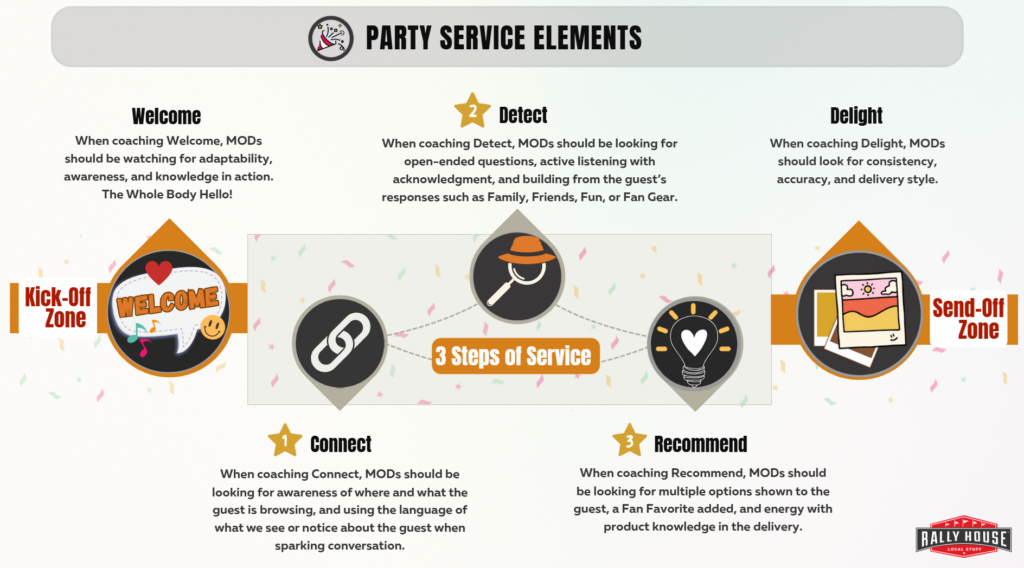
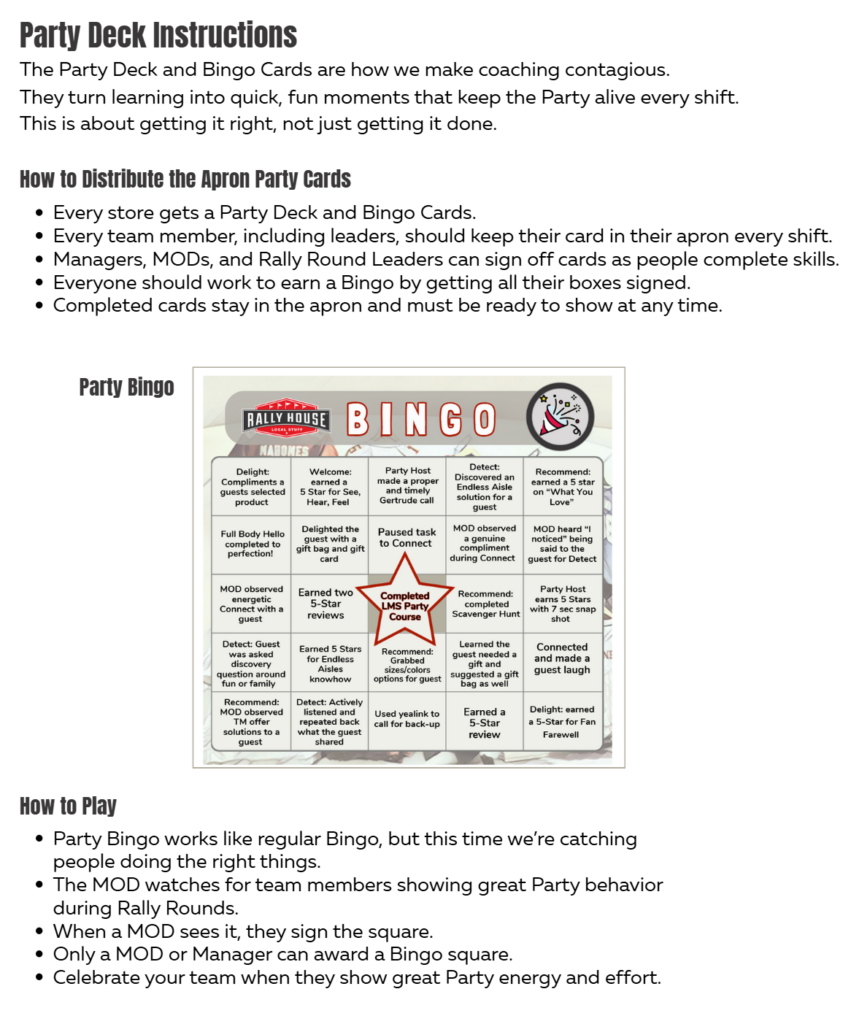
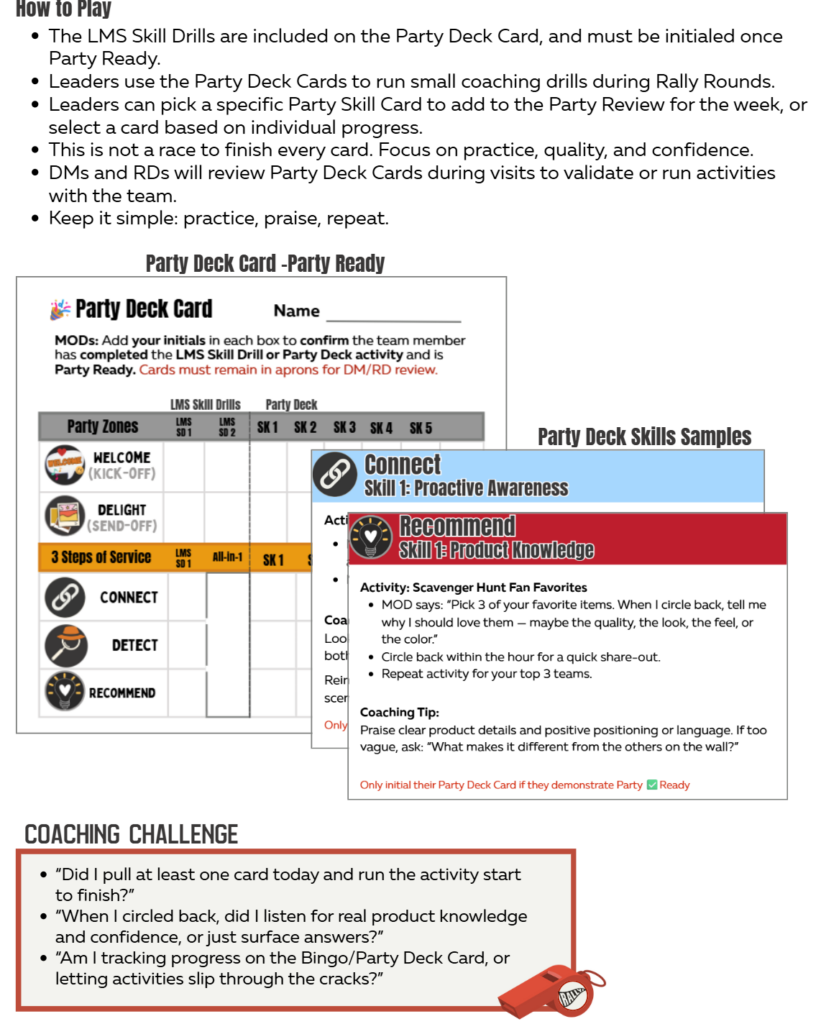
Holiday Meeting Material
Here are the 3 specified 3 Steps of Service Skill Card 4 for STATION 1. This will give you visibility, it is important to wait to share with your teams. This is being provided to facilitators. Please do not distribute with your teams until during the Holiday meeting.
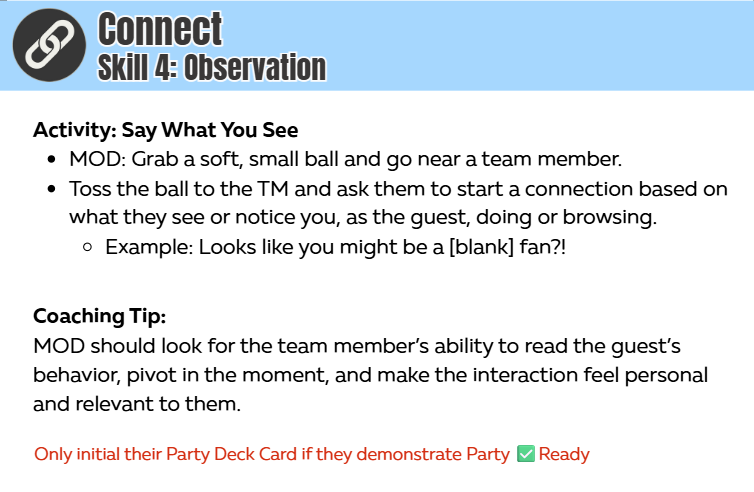
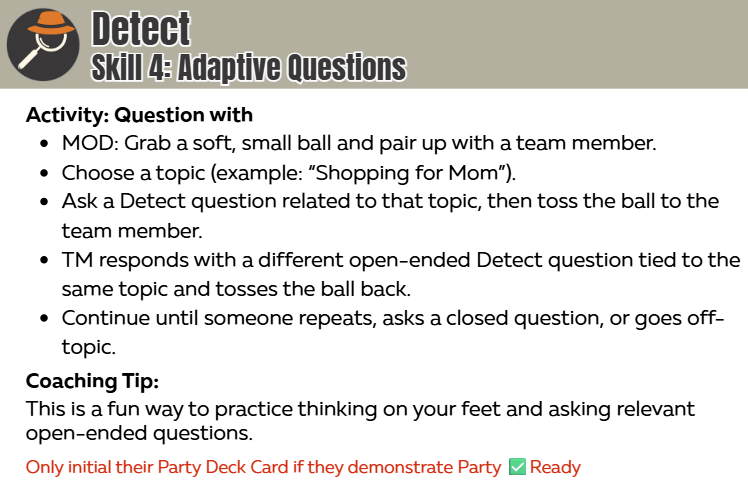
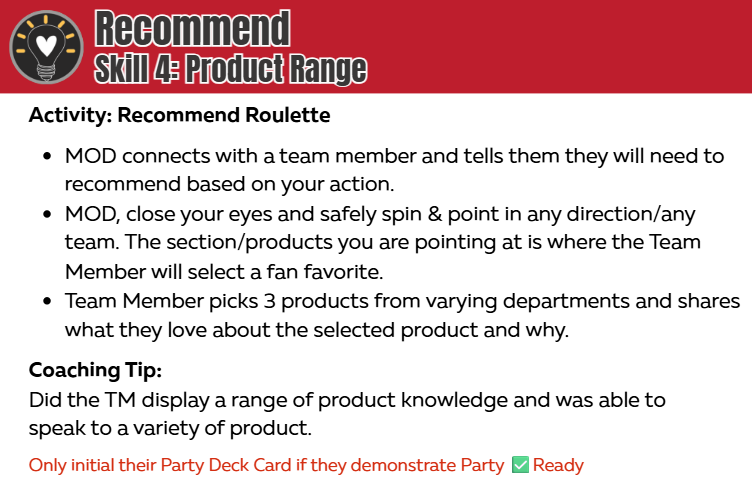
3 Steps of Service Skill Drills
Pilot Only: Store Video Submissions
🎯 Video Details Matter!
If the basics are off, the video will not pass. Review the expectation. Review all details.
Filming Requirements:
- NO MUSIC should be on during filming. Store audio must be off and no music added in editing.
- Guests should not be in the frame.
- Film vertically (portrait mode) for proper upload format.
Team Member Requirements: (Verbal consent is needed for TM’s participating in the video)
- Project your voice so it’s clearly heard.
- Speak clearly and face the camera.
- Be in proper dress code with name badge visible.
Environment Requirements:
- The area being filmed must be in visual compliance. Use your Zipline Merchandising folders to confirm accuracy.
- Keep the space clean and on-brand — no clutter, trash, or personal items visible.
✅ Check your footage before submitting
- Filmed vertically
- No store music during filming. Volume turned UP on device.
- Voices are projected and clearly understood
- Dress code correct for all team members
- Visual compliance confirmed-NO distracting merch tags or mess in the frame
- Lighting clean and bright, no windows in backgrounds
- Areas are tidy, clean, and on-brand
NOTE: We are not asking for Editing/ text or images added /transitions/ additional sound. The L&D team will edit and build the final copy.
How to Submit Your 🎬TikTok style clips in Zipline Groups Each Market participating in the test has an assigned topic and Zipline Group.
🆙To upload your clips:
- Navigate to Groups (located on the left sidebar).
- Click on your Party Pilot group.
- Create a new post and upload file by selecting “Add Attachment“. Your post should include:
- Store name and number
- Team member(s) and title(s) involved
- Video clips (no editing required; short clips or one combined 30–60 second video work)
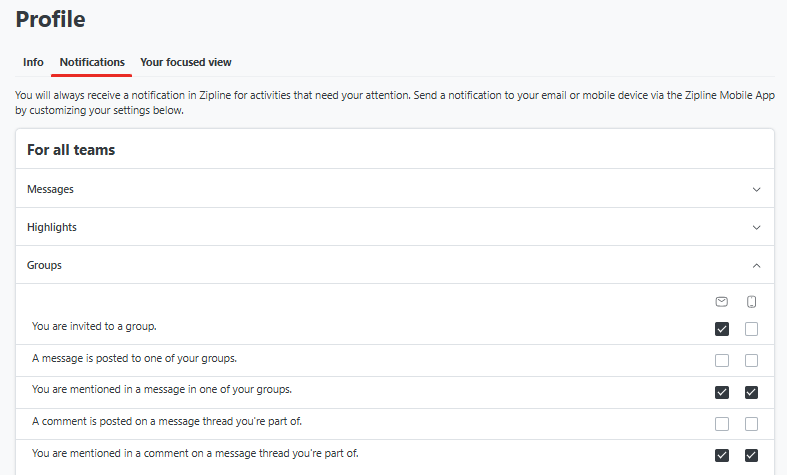
🚨 Check your profile settings!
Review your notification preferences and adjust to the recommended settings below to avoid constant notifications.
Rate the Party & MOD resources
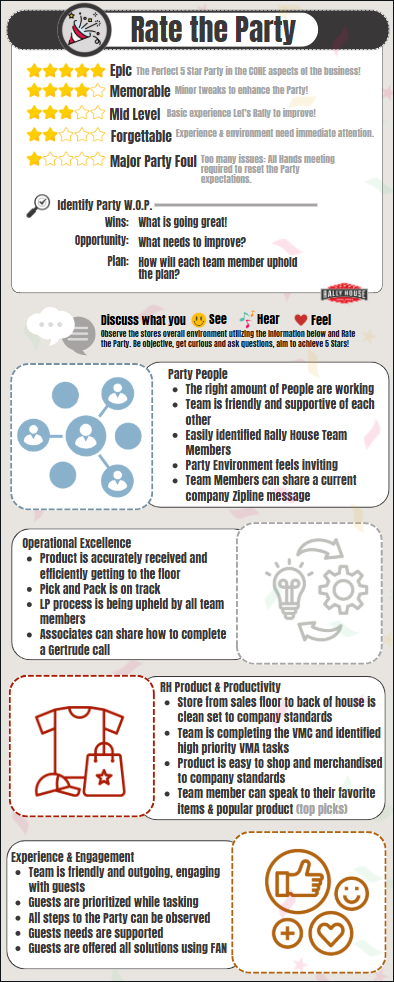
Rate the Party is how we measure how we measure the Party success to the CORE four areas of the business.
ANY Team Member who will ever be scheduled as the MOD or assigned to Rally Rounds needs to:
- Complete the Rate the 🎉Party Environment course in the Learning LMS.
- Complete one Rate the Party Assessment each month in Zipline.
- The assessment will calculate the score.
- The most recently completed assessment score needs presented to the MUL at the Start of the store visit.
RALLY ROUNDS is the daily process of Rating the Party. Scroll down and click on the Rally Rounds folder for all resources.
Fitting Room Process
🔻Fitting Room MOD Expectations
- All fitting room, bathroom, and stockroom doors must remain closed and locked during business hours. The fitting rooms are not self service and require an team member to support the guest.
- A fitting room person should be present and zoned during peak traffic times and holidays
- MODs need to follow the Rally Round process through the day to ensure the Fitting Room process is being upheld.
🔻Fitting Room Procedure
- Team members should ensure doors are closed and relocked after customers exit.
- Team members should have their fitting room key on their lanyard per the Store Key process.
- MOD, If locks are broken, submit a maintenance request in EcoTrak
- A go-back rack should be near the fitting room for returning unwanted clothes, which the team member manages and puts away the go- backs as time allows.
- MOD, contact the District Manager if a pipe 2-way is needed.
- Each adult Guest is assigned one fitting room, while young children can accompany their parents in a fitting room.
- Be cautious with strollers and bags in fitting rooms, as they pose theft risks.
🔻Fitting Room Experience: Guest Check In & Out Process
- Welcome guests to the fitting room and check for occupancy.
- Knock and ask if the fitting room is occupied before entry.
- Limit of 6 items at a time, use numbered rings on the door to indicate the amount of items going in to the fitting room.
- Hardline items can be held by the Team Member, at the cash wrap or outside of the fitting rooms, but should not be taken in the fitting rooms.
Guest Enters the Fitting Room
- Introduce yourself to the guest and ask for the items to place in the room and count the items.
- SAY: Welcome, may I have your items to place in the room. Looks like you have (number of items) going in, my name is (your name) and I will be back to check on you in just a couple of minutes”
Guest Follow-up
- Check on guests by knocking and asking if they need more items or sizes. Assist in offering other product options, or finding additional sizes or items as needed. Utilize MOD or another Team Member to support as needed.
Guest Exits the Fitting Room
- After use, confirm which items worked for the guest and offer new sizes if needed.
- Item matrix or Ship from Store are solutions to offer on out-of-stock items.
- Item count on the door should match the item count upon guest exit.
- SAY: “How did those (number of items) work for you today?”
- If you have missing items inquire with the guest.
- SAY: “How did those (number ring amount) work for you today? I’m only seeing (number of items)”
- If you have missing items inquire with the guest.
- Clear all unwanted items and clean the fitting room for the next guest.
🔻Jerseys in the Fitting Room
- Guests may have 1 style of jersey in the fitting room at a time.
- Up to 2 units of the same style are allowed (e.g., a small and medium).
- Additional sizes or styles are held by team member until the guest finishes with the first two.
- After trying the first two, team member will swap jerseys for other styles or sizes.
Rally Rounds
🎉Party Review Weekly Focus
The Party Review should occur between the MOD assigned to Rally Rounds and the team member beginning a shift, with hourly coaching connects through Rally Rounds.
Party Review Topic 04/13-04/19
| MODs complete the standard Party Review, provided on the Zone Chart ➡️ Complete the coaching below with scheduled team members, as many sessions as needed, during Rally Rounds. | 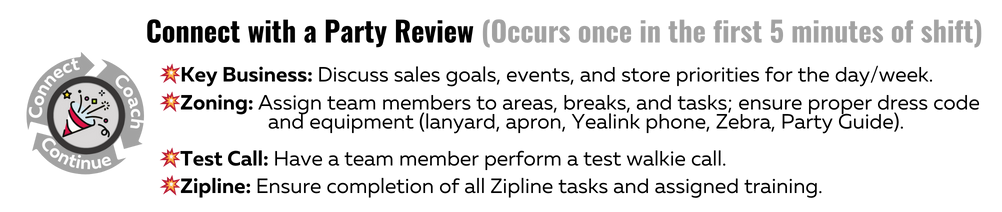 |
| MOD Validate during Rally Rounds | Topic | Why we do it |
| Service Ability | Endless Aisles Coaching. 1. Confirm the Team Member knows the process. – Ask: Show Me the Endless Aisle Process. 2. Confirm they are Recommending Endless Aisles. – Ask: When should they Recommend Endless Aisles to the guest? | Keep Endless Aisles an ongoing Recommendation at your store. |
Past Rally Rounds
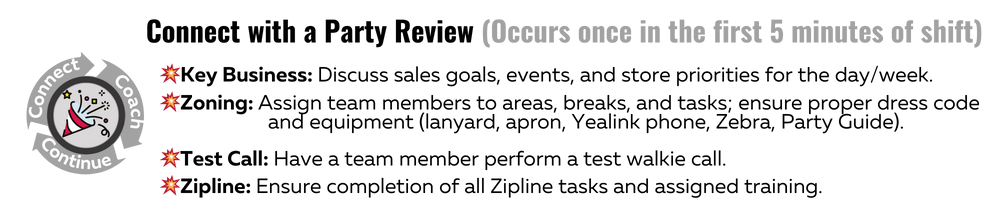
The Party Review should occur between the MOD assigned to Rally Rounds and the team member beginning a shift, with hourly coaching connects through Rally Rounds.
Party Review Topic 4/14- 4/20
MODs Cover the regular Party Review, plus the Party Host. Party Host continues to be a miss in stores.
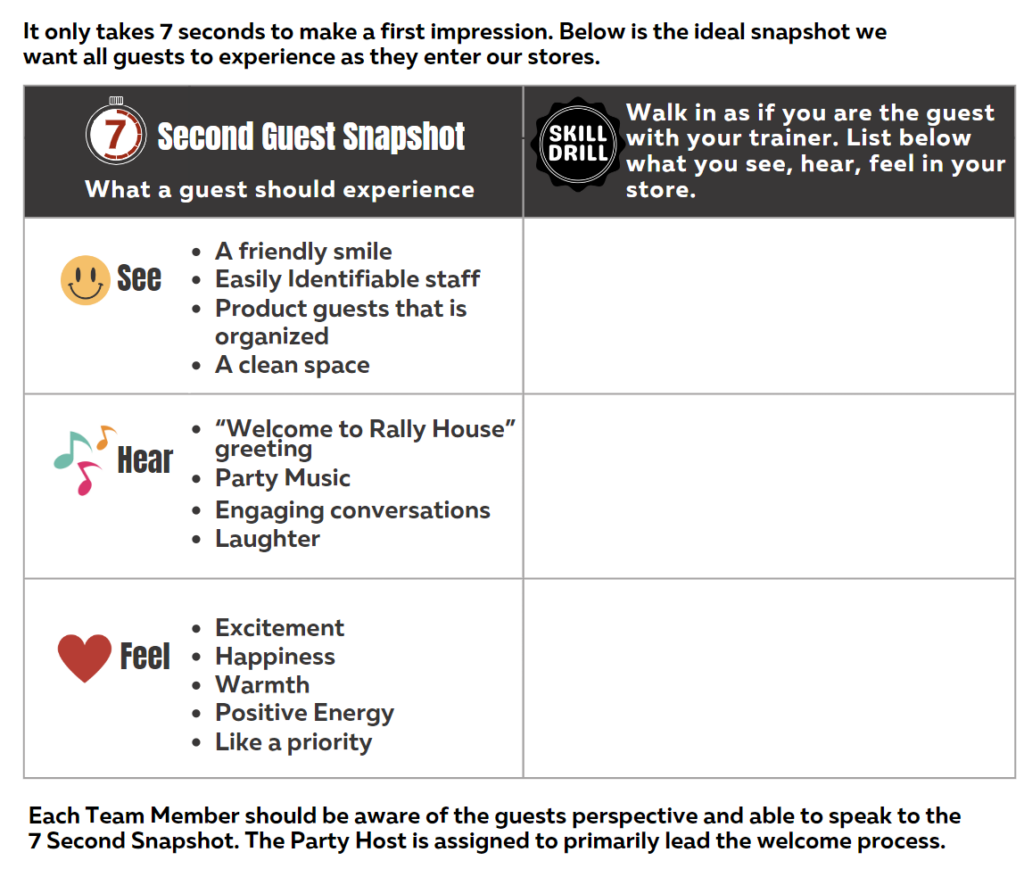
Party Host Review: all Party Hosts need to understand their role and how to stay visible and available to guests while they complete various tasks.
- MOD prep by using the MOD Party Host Guide
- Ask the Team Member to:
- Review the ⚡Party Host Role (print pdf)
- Watch the Party Host Play by Play
- Complete the Skill Drill below
Party Review Priority Topics 4/7-4/13
⚾ Baseball season means cool, new MLB Jerseys! 🧢 Endless Aisles means any fan, at any location can be offered the latest and greatest MLB Jersey regardless of if your location carries the product.
- Team Members need to review the MLB Jersey Guide
- MOD should ask what Jersey style is their favorite and how they would describe the fit and size. Coach as needed.
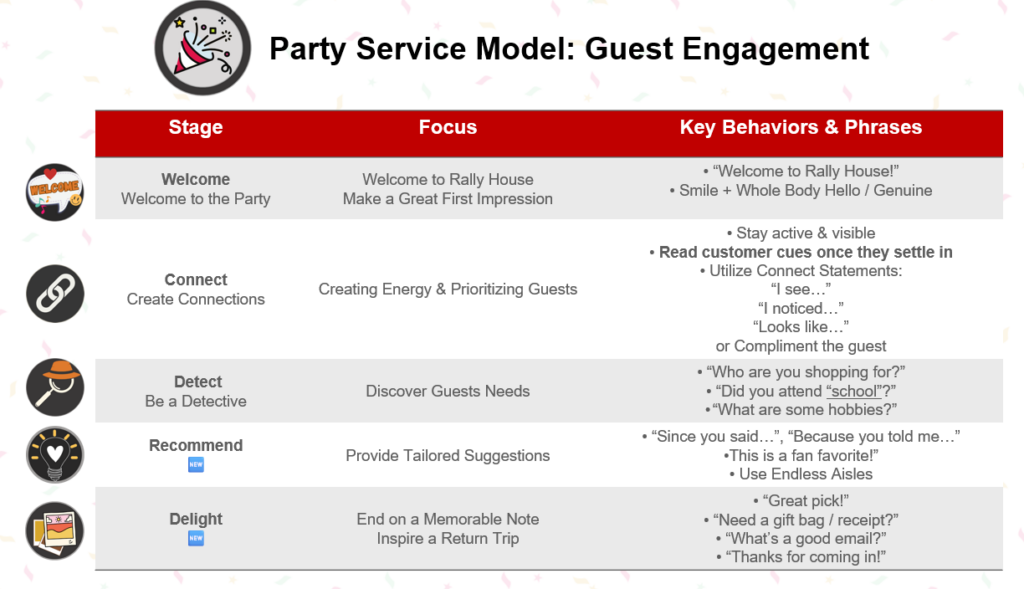
- MOD & Team Member practice using the FAN method but work in a conversation starter question like “What MLB team are you following?” or “Who is you favorite MLB player this year?”
- Come up with a few more questions to ask the guest and offer Endless Aisles.
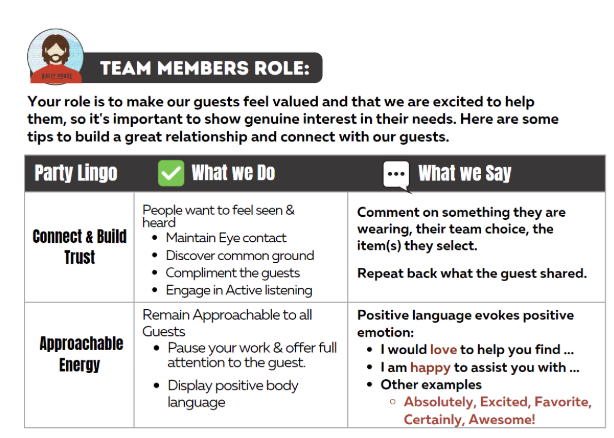
Behaviors of Party Steps 2&3 need upheld by all team members.
- MODs clarify it is not just the Party Hosts role to follow the Party Steps. Observe team members and look for Step 1 & Step 2 behaviors. Coach as needed.
- Validate the team is able to mingle with guests while staying productive.
- Validate the team is building trust with approachable energy before the move into the Detect step using FAN.
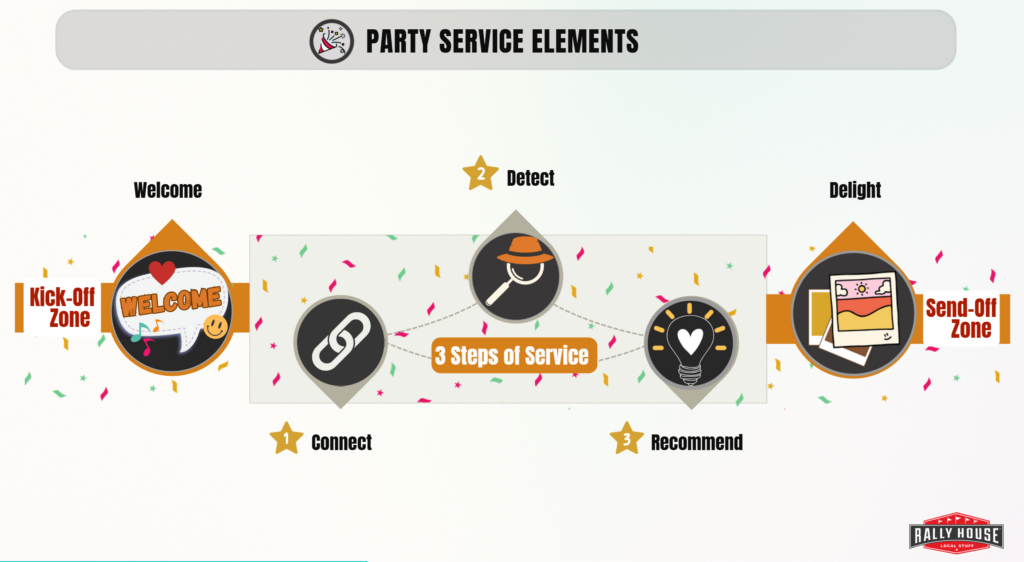
Step 1: Welcome
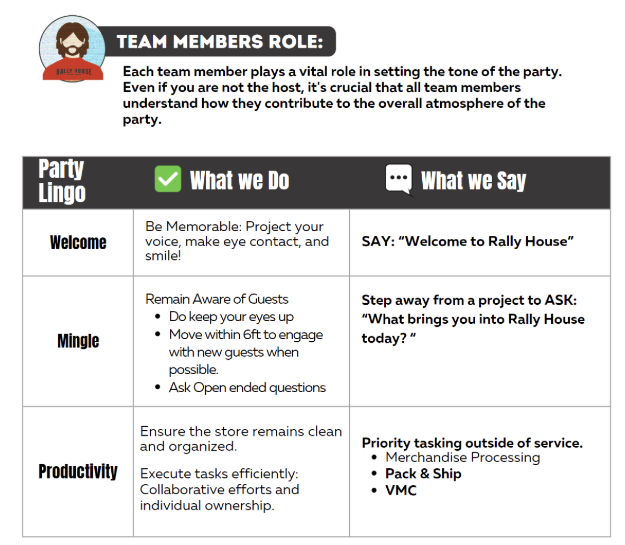
Step 2: Make Connections (Connect)
Party Review Priority Topics 3/31-4/6
Continue coaching Endless Aisles (3/18-3/30 MOD direction available below)
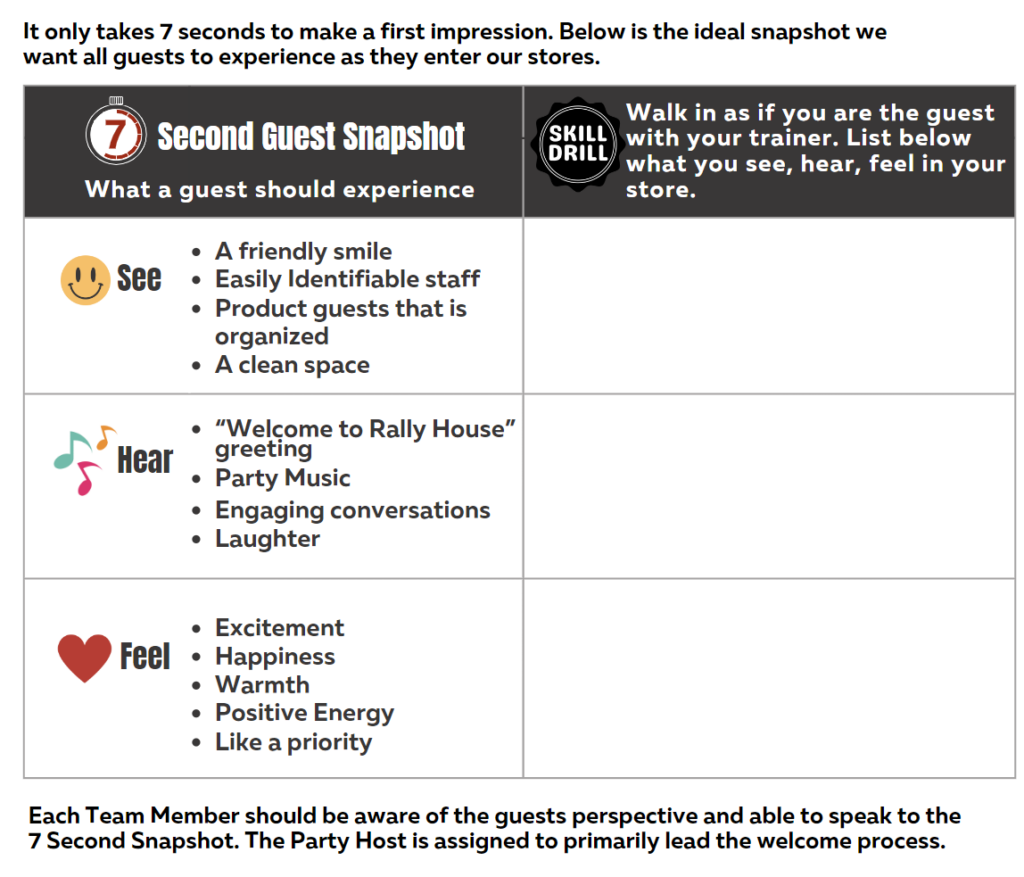
Party Host Review: all Party Hosts need to understand their role and how to stay visible and available to guests while they complete various tasks.
- MOD print and review the MOD Party Host Guide, this is a step by step MOD coaching guide to set the expectations.
- Ask the Team Member to:
- Review the ⚡Party Host Role (print pdf)
- Watch the Party Host Play by Play
- Complete a 7 Sec Snapshot & coach to the outcome
⚾ Baseball season means cool, new MLB Jerseys! 🧢 Endless Aisles means any fan, at any location can be offered the latest and greatest MLB Jersey regardless of if your location carries the product.
- Team Members need to review the MLB Jersey Guide
- MOD should ask what Jersey style is their favorite and how they would describe the fit and size. Coach as needed.
- MOD & Team Member practice using the FAN method but work in a conversation starter question like “What MLB team are you following?” or “Who is you favorite MLB player this year?”
- Come up with a few more questions to ask the guest and offer Endless Aisles.
Party Review Priority Topic 3/18-3/30: Endless Aisles
Endless Aisle is the Top Priority for the company. WHY? Our aim is to NEVER SAY NO to our Guest. Endless Aisles means it’s not just about your local assortment at your location; the companies inventory is what you can offer as a solution to our guests.
The challenge is for all stores to achieve 3% of weekly sales, so it’s time to practice and perfect how we offer Everything a Fan Could Need! For the stores at or above a 5%, keep raising the bar of excellence for Rally House to show what’s possible!
MOD’s
- Conduct the regular Party Review during the initial Connect, including the weekly RR Coaching topic. Team members must review all Zipline messages and tasks every shift.
- Allow time for team members to review the priority topic and resources.
- During Rally Rounds:
- Connect and practice the RR Coaching Topic Skill Drill as needed.
- Celebrate your teams success and update the team on Endless Aisle results by using the updated⚡Zone Chart .

RR Coaching Topic
- Endless Aisle Skill Drill, practice makes perfect! MOD conduct during Rally Rounds.
- Observe interactions with team member and the guest and provide feedback.
✨Additional Coaching Resources
Endless Aisles FAQ
Q: Does it matter which store is selected in Sitoo and if the item is in stock?
- A: NO. The direction is to validate availability on the Rally House website, and if the item is available, select ANY store in Sitoo. The One Pager clearly outlines qualifiers.
Q: Does the guest receive any update on their order?
- A: YES. Your role is to confirm their information, as outlined in the Endless Aisles Process guide. The guest will receive an email once the item has shipped or cannot be fulfilled.
Q: Has there been an increase in customer service issues because Endless Aisle orders can’t be fulfilled?
- A: NO. Ordering through Endless Aisles is no different than placing an order online, except the store receives the revenue and the guest gets free standard shipping. This process replaces the free shipping coupon.
MOD Skill Drills (Role Plays)
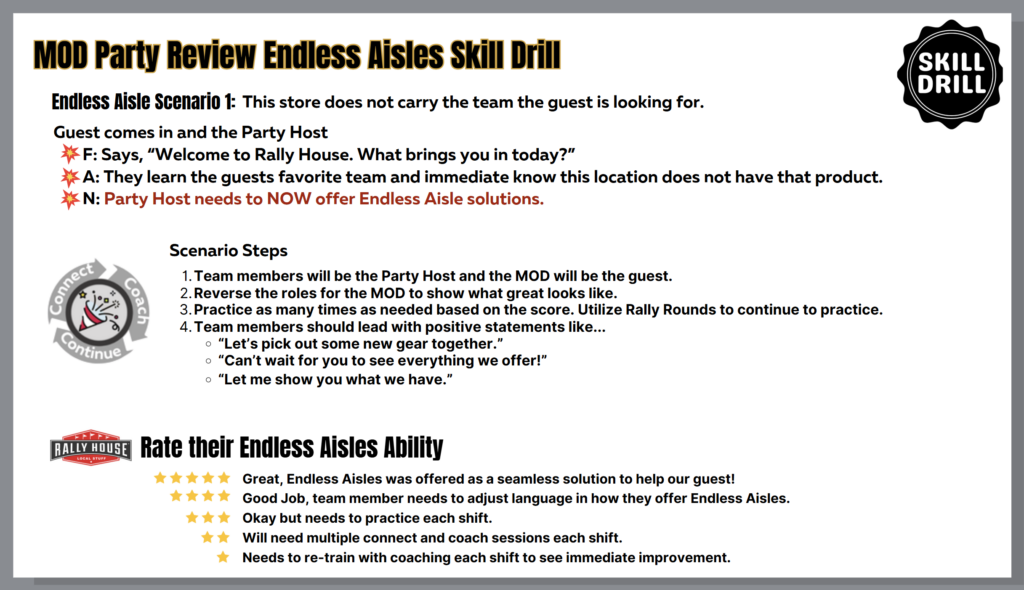
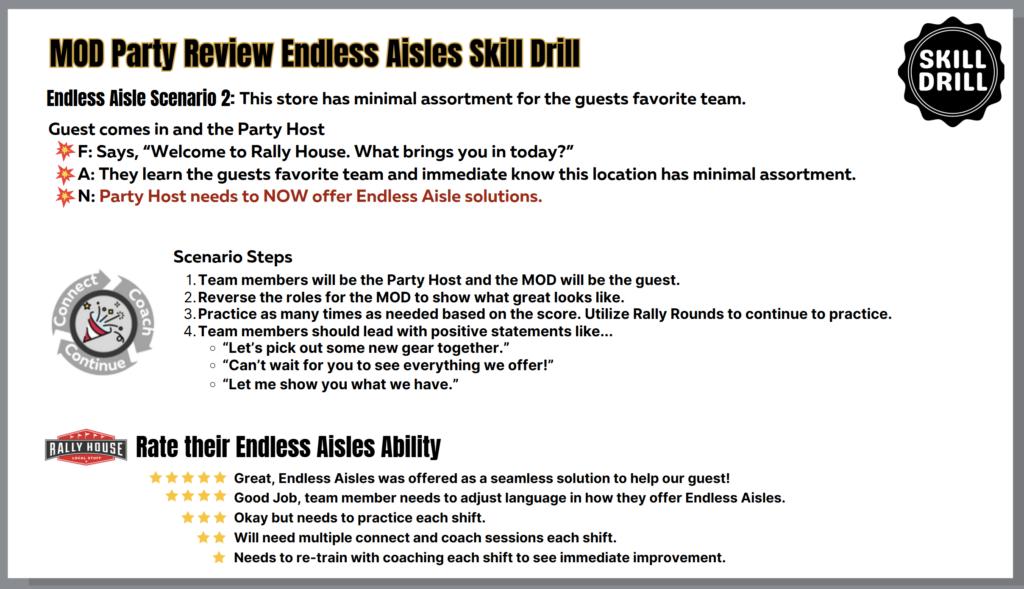
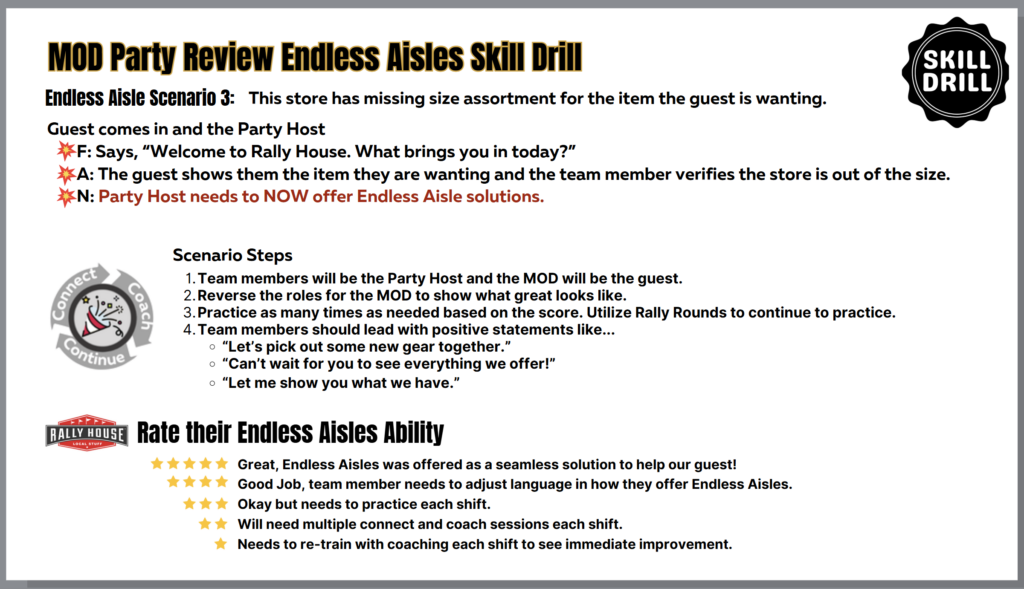
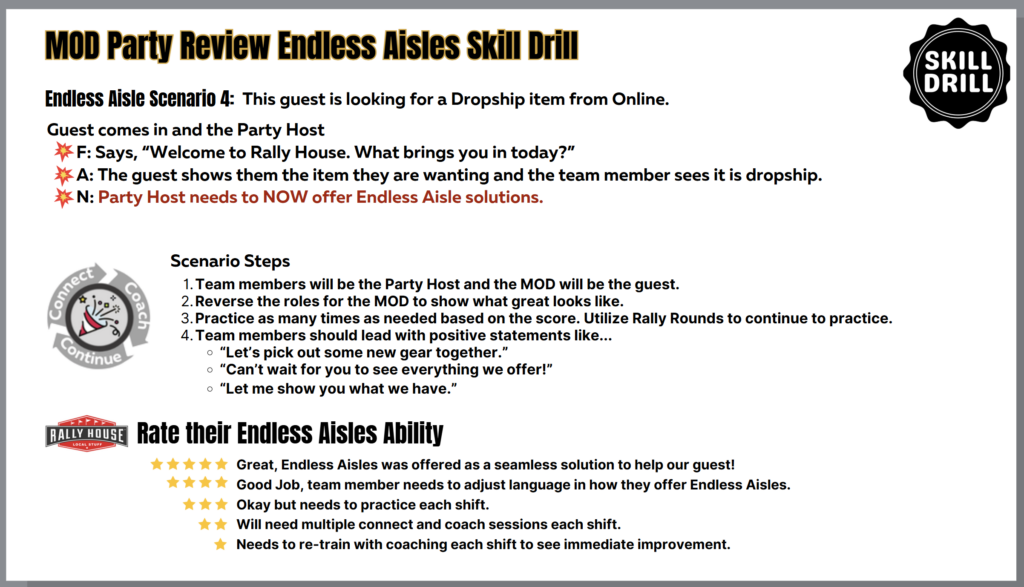
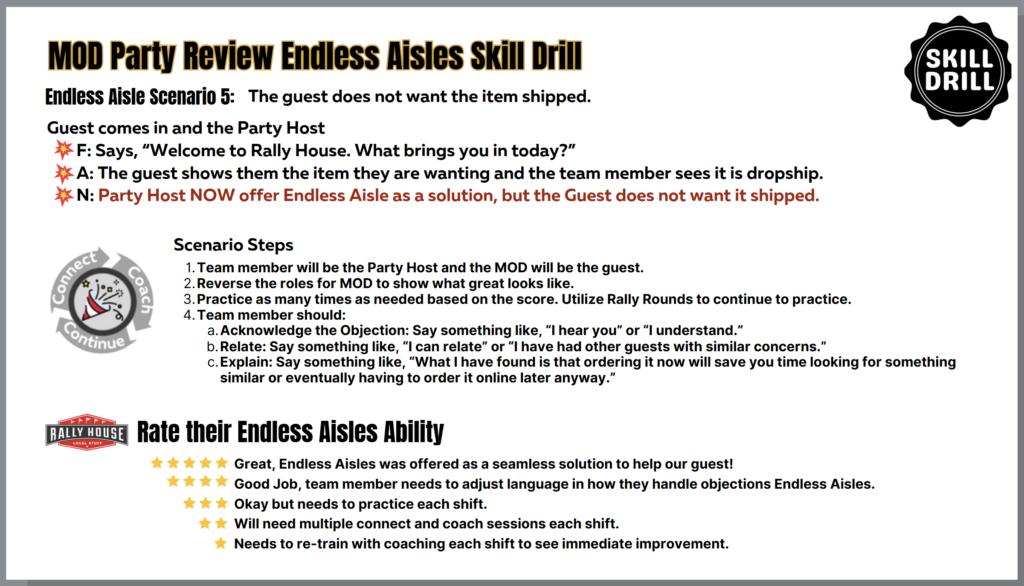
Endless Aisles Skill Drills (Role Play)
Skill Drills serve as an essential coaching tool that helps reinforce learning and cultivate the behaviors we desire to see. Utilize the below⬇️during the Party Review, Rally Rounds, or Store Visits.
MOD Response Guide
MODs and Rally Rounds leads are here to support the guest and team experience. You’ll see a range of requests and situations throughout the day, and your role is to help remove barriers, offer solutions, and keep the floor moving.
Below is a quick guide to help you prepare for some common moments you’ll encounter in store.
Sitoo
| Topic/Scenario | Response/Resource |
| Employee Discount – email not working | 1. From NetSuite, search the team member 2. Click the “Employee Discount Profile” tab 3. Confirm the correct email |
| Exchange – No Receipt Questions | Return/Exchange Chart |
| Endless Aisle Return | Online Return Chart |
| Return/Exchange – Product Quality | Our leaders are empowered to do what’s right for the guest. – Use policy flexibility when a quality issue is clear (e.g., item failed after normal use). – Aim for a solution that reflects the quality we stand behind. |
Loss Prevention
| Topic/Scenario | Response/Resource |
| Counterfeit Bills Detected | Test the bill(s) in question, if the bill is not passing the approved test methods for your location: – Ask for another form of payment – Act as if they have mistakenly received counterfeit bills – Apologize for any inconvenience |
| SCAM Call | 1. If ANY request of pay or money movement occurs, SAY: “You need to validate the request.” 2. ⛔ Stop engaging and hang up. 3. Immediately complete the Incident Form in NetSuite. 4. Alert Chat, IT, and MUL. 5. The company will validate the request and issue next steps through proper channels. |
| Safety Concerns | Safety and Security folder |
| Incident Reporting | ALL Incident Reporting folder |
Customer Service Issues
- Holiday Hours starting 11/24/25, 6am-11pm
- Reg Hours: 8am-9pm
| Topic/Scenario | Response/Resource |
| Guest Wanting Immediate Resolution | In the moment- dial 1-800-381-9177 – A store calling can skip the automated AI prompts |
| Refund on Shipping Cost | Not a store level process. Provide the guest with these options: 1. They may contact Customer Service themselves 2. Offer to call Customer Service for them (this will put the call to the front of the line) |
🎉Party People
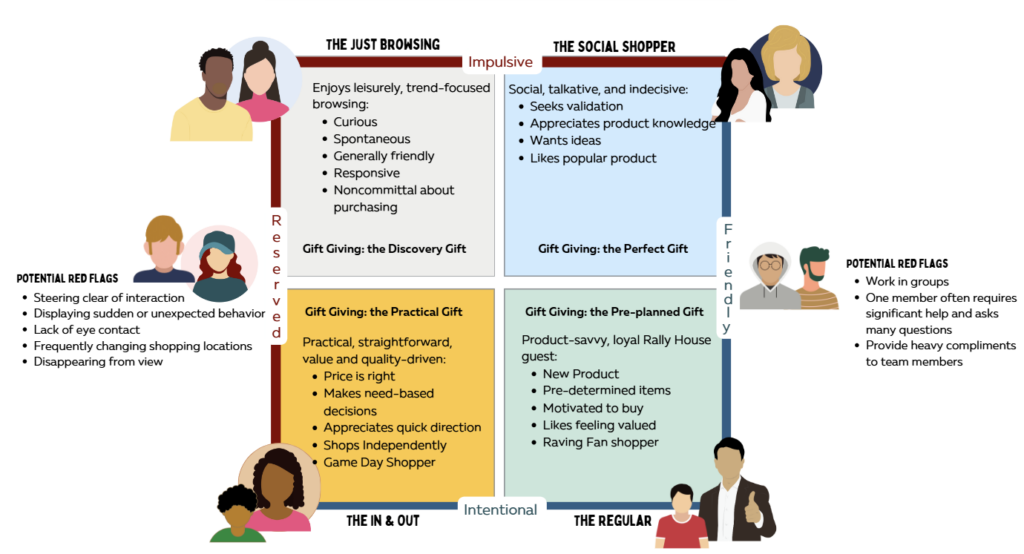
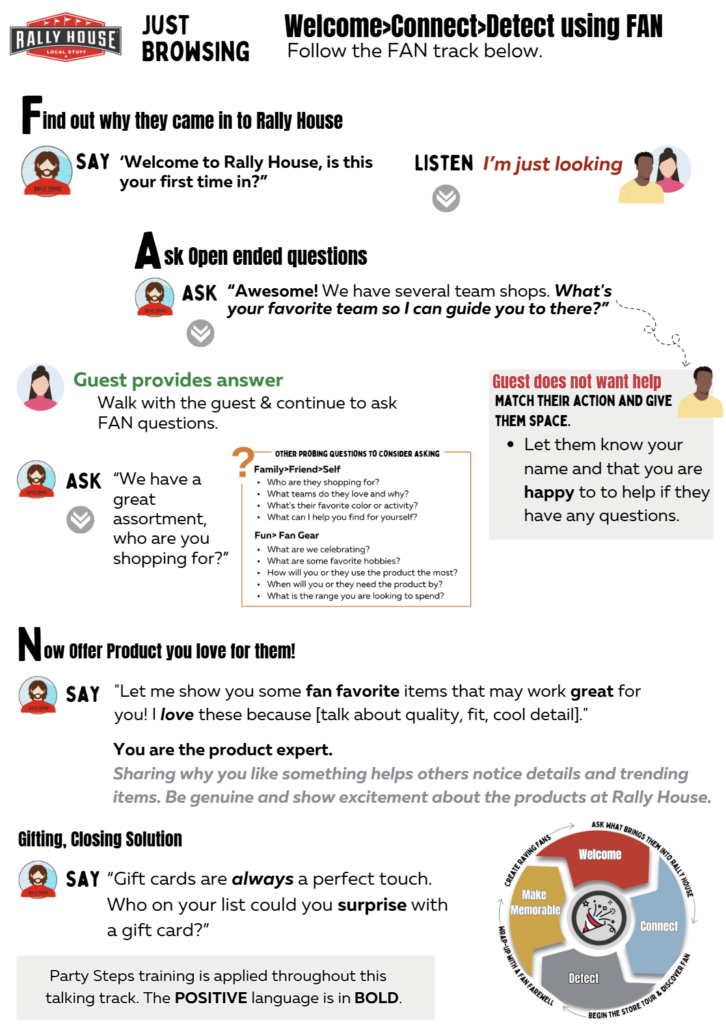
The Social Shopper
▶️Watch to learn more about the social shopper.
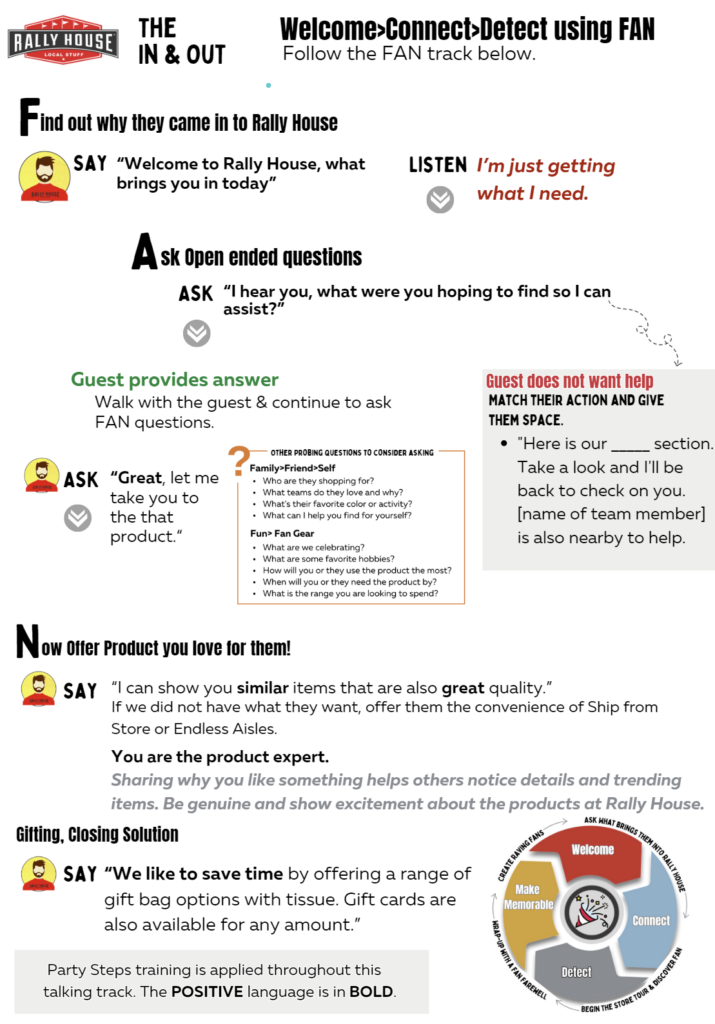
The In & Out Shopper
Party Crashers
Full House: Breakaway Statements
A Full House means you have multiple guests waiting or browsing and you need to keep the Party moving.
What a Breakaway Is
- A breakaway is used when you need to shift from helping one guest to acknowledging or helping others during a Full House.
- The goal is to balance your time, keep flow strong, and make sure every guest is seen.
When to Break Away
- You have a Full House 4+ guests in your area or a single team
- You cannot give one-on-one attention to every guest
- You need to keep the line or zone moving
- You need to acknowledge additional guests quickly
Breakaway Statements Ideas
- “I’ll give you the opportunity to explore our product, and I can check back in.”
- “Take a look at our [blank] selection, we have several styles to choose from! I will be back over to check on you”
- “Here is our [women’s team] section. I am going to check on a few other customers in this area. If you need suggestions or any other help, my name is [Your Name].”
- “Here is our _ section. Take a look and I’ll be back to check on you. Stefanie is also nearby to help.”
TIPS on ending an interaction with a guest
- Be honest about why you need to step away
- Give them something to explore
- Introduce them to another team member if needed
🎉Party Prep: Manage the Day Bundle
🔻 Scroll down to access the “Manage the Day” printable checklists

Managing the Day
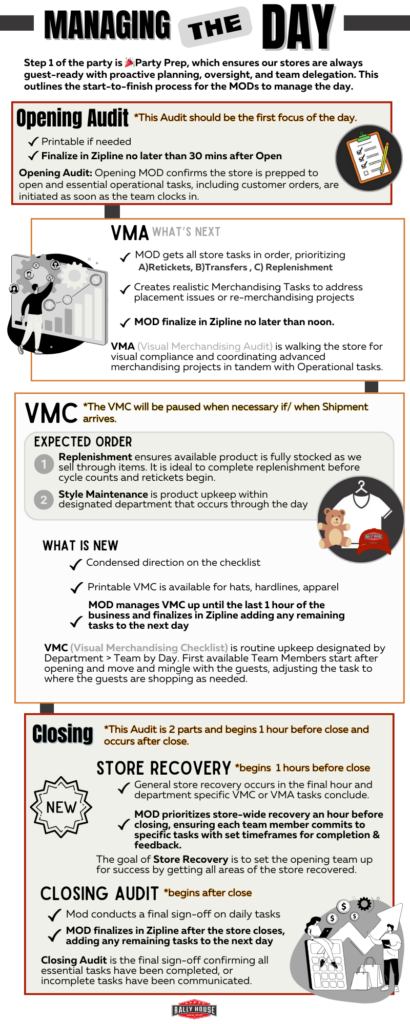
Opening and Closing Process
🔽 Store Opening Policy Statement
The purpose of this policy is to establish procedures covering the proper opening of the store at the beginning of the day. Following proper store opening procedures is important to ensure that tasks are not overlooked, and the store is set to be successful before each day.
- An approved Key Carrier must be scheduled every morning to open the store. This will be a member of the Management team (Store Manager, Assistant Store Manager, Manager in Training, or Team Sales Lead).
- Each member of the Management team should have a front door key checked out to them following the Store Keys Policy.
- Upon entry into the store, the store doors should be relocked and remain locked until opening.
- The opening Manager should use the alarm panel to disarm the store by punching in their code+1 (OFF).
- Employees have 60 seconds to disarm the building upon entering.
- Registers should open at the approved register till amount unless they were closed the previous day under this amount due to a cash return.
- Before taking the deposit from the previous business day to the bank, check and ensure the store does not need a change order.
- When taking a deposit to the bank, the deposit must be inside of the clear deposit bag. The clear deposit bag is then inserted into a vinyl bank bag. The bank bag is then placed into a retail bag (either plastic or paper) when it is removed from the store.
- This is to keep the bank bag disguised for the safety of team members.
- Unlock to store doors at the approved opening time.
🔽 Store Closing Policy Statement
The purpose of this policy is to establish procedures covering the proper closing of the store at the end of the day. It is important that all tasks be properly completed to assure a smooth opening the next day. Personnel will most likely be different upon opening, so all tasks must be accomplished without need to communicate follow up task or handle issues that can only be handled by those closing at the end of the day.
- An approved Key Carrier must be scheduled every night to close the store. This will be a member of the Management team (Store Manager, Assistant Store Manager, Manager in Training, or Team Sales Lead). At the scheduled closing time, close the doors and lock them.
- Each member of the Management team should have a front door key checked out to them following the Store Keys Policy.
- At the approved closing time, the store doors should be locked and remain locked.
- Registers should be counted and closed to the approved register till amount after the doors are locked.
- Create a deposit to be taken to the bank on the following business day.
- Deposits need to be counted by two employees and both employees who counted the deposit sign the deposit slip.
- Place the store’s lockbox in the designated area at the cashwrap with camera view for the opening Manager to locate the next business day.
- Both closing employees should sign off on the Door Log(s).
- The closing Manager should use the alarm panel to arm the store by punching in their code+2 (AWAY).
- Employees have 60 seconds to leave the building after it is armed. Both employees exit the store at the same time.
Phone Guides
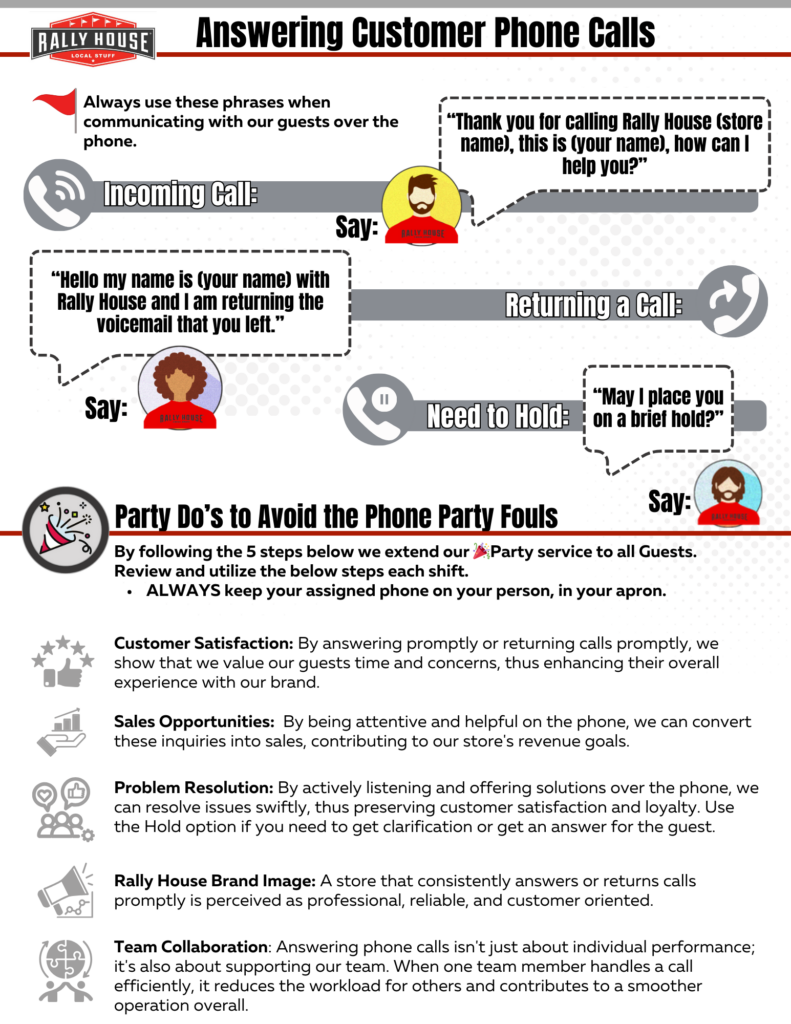
Store Phones
🔽 Phone Greeting
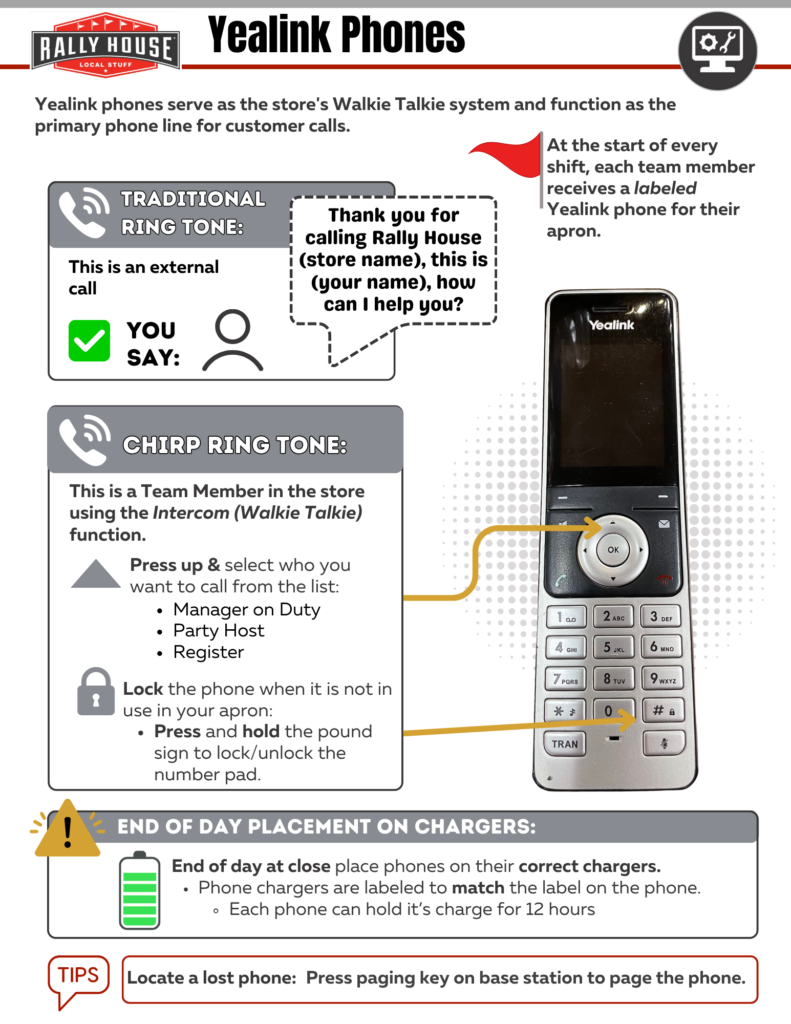
- During most of the year, the phone greeting a store employee uses to answer the phone is “Thank you for calling Rally House (store name), this is (employee name), how can I help you?”
- During the Holiday season, the phone greeting a store employee uses to answer the phone is “Season’s Greetings from Rally House (store name), this is (employee name), how can I help you
🔽 Voicemails
Setting Up Inbox Rules:
- When a caller leaves a voicemail, it will automatically send an e-mail to the e-mail on file for the phone number, which is the store’s e-mail.
- Setting up inbox rules will allow for these e-mails containing voicemails to be marked as high priority in the store’s inbox and alert the MOD checking e-mail that there is a voicemail.
- Select an e-mail in the inbox from AT&T Office@Hand and double click on the e-mail. The contact dialog box will appear.
- Click “Add Contact”
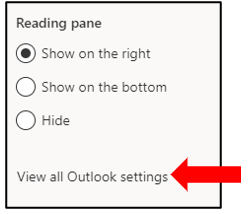
- Select Settings (gear symbol) in the top right corner.
- Select “View all Outlook settings”.
- Select “Rules” from the left column and then click “+Add new rule”.
- Set the name of the rule as AT&T.
- Add a “From” Condition with the contact added- AT&T Office@Hand.
- Add the action of “Mark with importance” and select high as the level of importance.
- Click save.

🔽 Listening To Voicemails
- When a store does not answer a phone, the customer is given the option to leave a voicemail. Voicemails should be checked for and listened to every fifteen minutes via store e-mail.
- When the store receives a voicemail, a high importance e-mail will come through from AT&T Office@Hand if the inbox rules were set up correctly.
- To access the voicemail, click on “here”.
- Sign into AT&T Office@Hand with the store’s e-mail and password.
- The password is RallyHouse1989.
- The voicemail box for the store will load.
- Listen to the voicemail from the customer by pressing the play arrow.
- Check the box next to the voicemail and select delete.
- The employee in charge of listening to voicemails should call the customer back and delete the voicemail so the next employee does not think this voicemail is unresolved.
🔽 Calling a Customer Back Who Left a Voicemail
Any customer who leaves a voicemail should receive a call back to ensure that their question, issue, or concern is properly addressed. Calling our customers back promptly will provide to a memorable experience.
- The employee in charge of listening to voicemails should be the employee to call the customer back.
- When the customer answers their phone, the employee should say
- “Hello my name is (employee name) with Rally House and I am returning the voicemail that you left.”
- While talking on the phone to customers the employee should smile.
- Never assume or guess an answer to a customer’s question.
- Ask the customer if you can place them on hold while you find the answer to their question(s).
- Use the “Hold” button to place a customer on hold.
- Ask the customer if you can place them on hold while you find the answer to their question(s).
- Continue to help the customer over the phone and ensure that you are providing a great experience for them.
- When finished with conversation ensure that the customer does not need anything else before you hang up the phone.
Yealink Phones
Customer Request for Merchandise
🔻 Policy Statement: Customer Request for Merchandise
Sampler Stores, Inc. constantly strives to provide guests with a product selection that meets their needs and allows them to select quality merchandise within their price range.
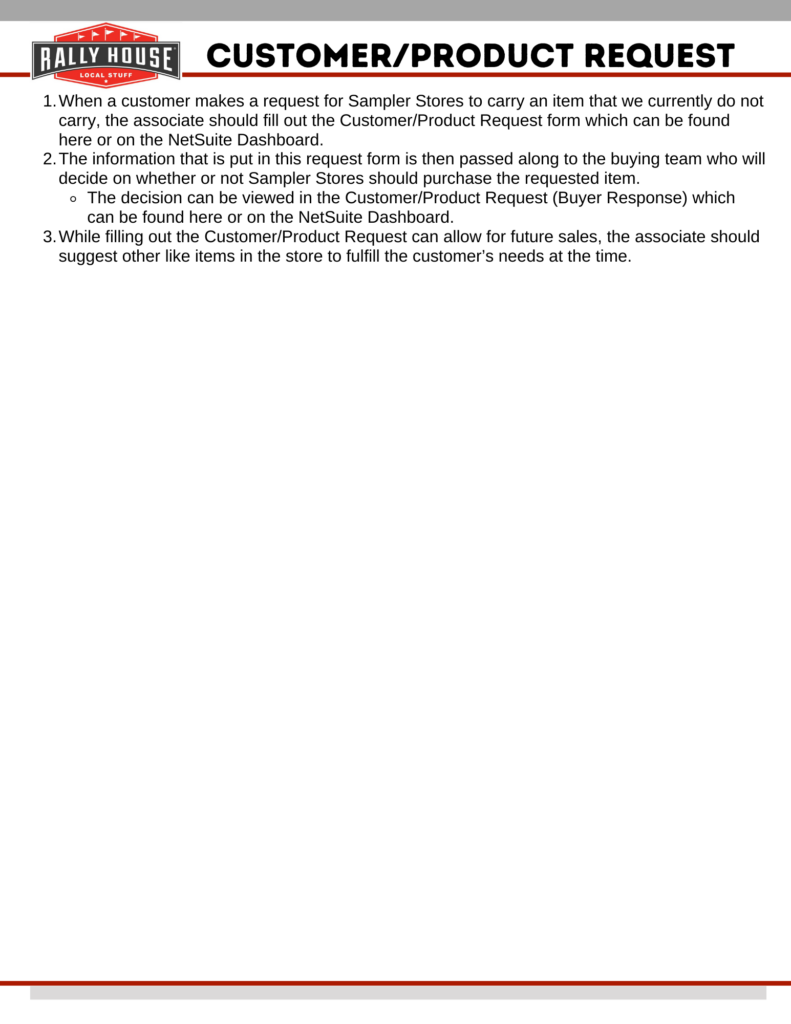
Actual sales figures are never indicative of sales that were lost. The Customer/Product Request form on NetSuite is designed to enable each associate the ability to provide the buying team insight on what customers are requesting in the field. If a customer does not find the merchandise they wished to purchase at your store, fill out the Customer/Product Request form. Ship to store is another way we can ensure guests get the product they desire.
🔻 Scroll Down for Further Information 🔻