Standard Operating Procedure & FAQ
Flags and Click Home buttons are clickable to make it easy to navigate the page



INTRODUCTION
THE PLAY: Hot Market is a high-impact moment when a team wins a conference or championship, driving immediate fan demand. Stores see a sharp increase in traffic, sales, and online orders. The play is simple: be ready, move fast, execute with precision.
IMPACT: Hot Market is more than just a sales opportunity, it’s a key moment to connect with our communities and fans. Guests are coming into our stores to celebrate something meaningful to them. How we show up in these moments matters. When executed well, Hot Market:
- Drives significant increases in sales and transactions
- Strengthens guest loyalty and brand connection
- Creates an exciting and engaging in-store experience
ON FIELD TERMINOLOGY
Small Hot Market: A Small Hot Market includes 1–2 styles and is typically managed using existing store resources.
Medium Hot Market: A Medium Hot Market includes 3–15 styles and may require light adjustments to store setup and staffing.
Large Hot Market: A Large Hot Market includes 16+ styles and is a high-impact event with significant increases in traffic, sales, and fulfillment.
Pre-Prints: Product delivered before the game, received, and held in the backroom until a team win.
Onsite Deliveries: Product that is delivered directly to the store by a Rally House driver or courier, after a win.
If WIN Shifts: Shifts that are scheduled but only worked in the event of a team win.
Super Flex: The process of temporarily shifting or condensing product/fixtures to create space for Hot Market.

Hot Market Party Prep
THE PLAY: Hot Market Party Prep focuses on reviewing upcoming Hot Markets in NetSuite to assist in planning & mapping for the Store.
IMPACT: Proper planning ensures the right fixtures are in place to support product flow and presentation based on the number of styles your store will receive.
GAME PLAN:
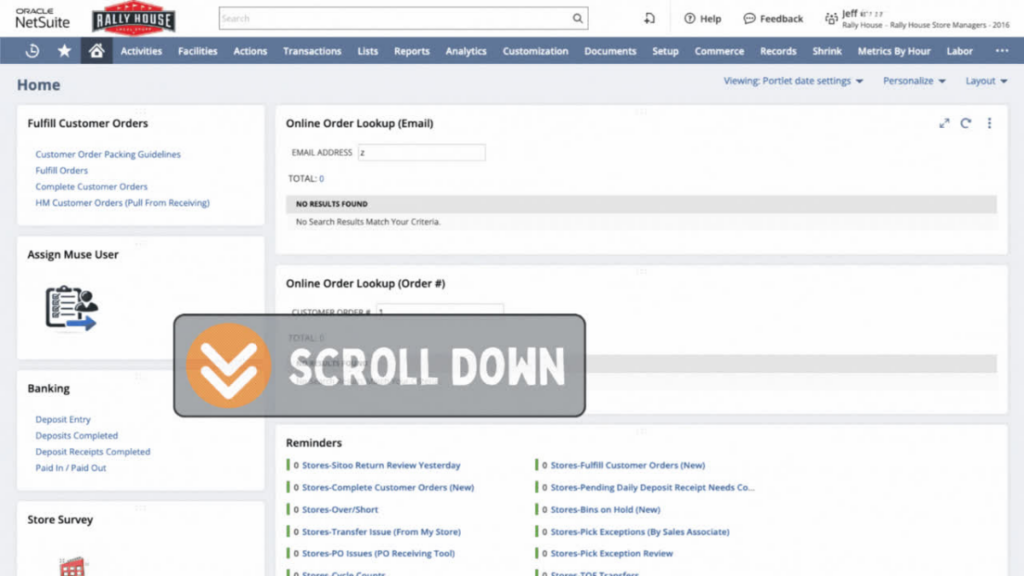
Review Hot Markets in NetSuite
- On the NetSuite dashboard, click on “Upcoming Hot Markets” link.
- Use Filters to locate the correct Hot Market Event – when filtering you can type in the box (i.e. MLB)
- Filter by League, Team, Event, and by inventory location.
Hot Market Checklist
Print and review this checklist to ensure that you are ready to go! (Checklist being moved out of old HM document into standalone checklist to be linked)
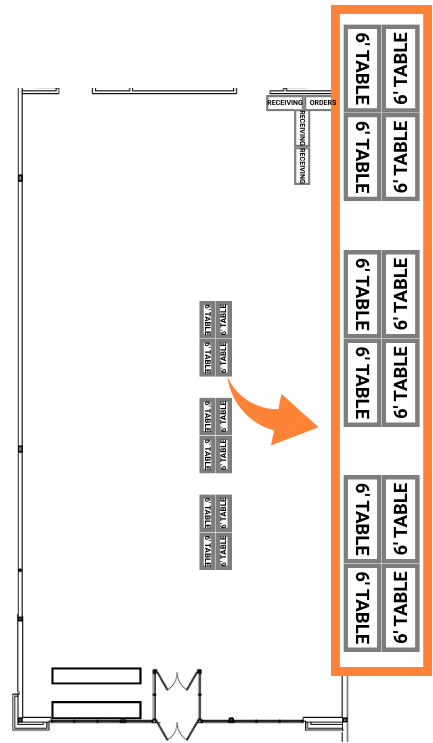
Plan Fixtures Based on Styles
- Use the NetSuite information to help determine the number of banquet tables, baker’s racks, and hanging fixtures needed based on the number of styles your store will receive and discuss with your District Manager.
- Your District Manager will assist or create a store map for a medium or large Hot Market.
| Fixture | Styles per Fixture | Example: You have 6 Styles |
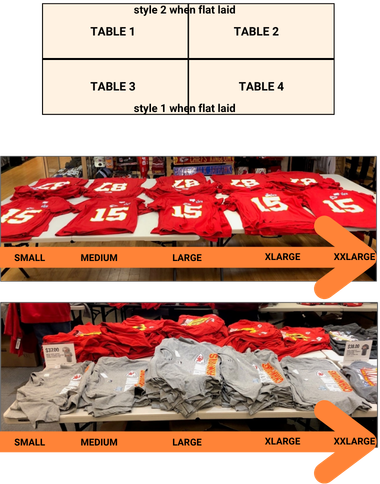
| Banquet Table – flat laid | 1 style per 2 tables | 12 tables are needed |
| Banquet Table – half folded | 1 style per 1 table | 6 tables are needed |
| Bakers Rack – ½ folded | 2 styles per rack | 3 racks are needed |
| Bakers Rack – board folded | 4 styles per rack | 1.5 racks are needed |
| Hanging Fixtures | As Needed | As Needed |
- Work with your District Manager to determine the best solution if space is limited.
Hot Market Product Deliveries
THE PLAY: There are three different types of deliveries that a store can see during a Hot Market: Common Carrier, Pre-Prints, and On-Site Rally House Driver Deliveries or Coureur.
IMPACT: These deliveries require specific handling to ensure product is received correctly, secured appropriately, and only made available for sale at the correct time.
GAME PLAN:
Common Carrier Deliveries
Ensure all items have a price tag and a price on the label.
Arrives via UPS, FedEx, or another common carrier after a team win
This shipment will be plentiful, and the store should plan for a secondary receiving location in a non-selling team section of the store.
Partner with your District Manager to finalize this location.
These are Direct Shipments and will need to be received through PORT using the normal receiving procedure.
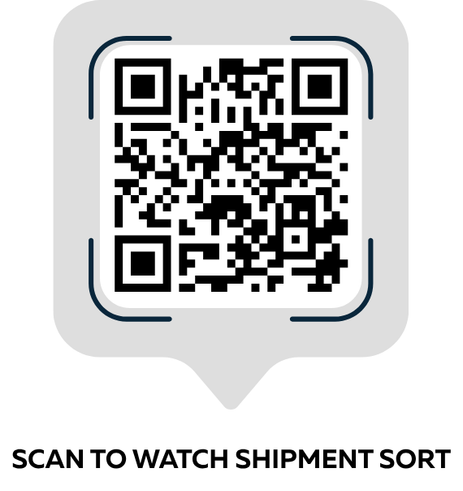
When shipment arrives sort shipment into 3 categories:
Hot Market (priority)
Core product of Hot Market team or local team colors
All other teams
On-Site Rally House Driver Deliveries or Courier
- On-sites occur after a team win
- This product will already be received into your system for the store.
- On-sites arrive to stores without price tags on them.
- If communicated that the store can use Sitoo Quick Add, do not tag.
- If not communicated, the store will need to tag all units for inventory management.
Pre-Prints
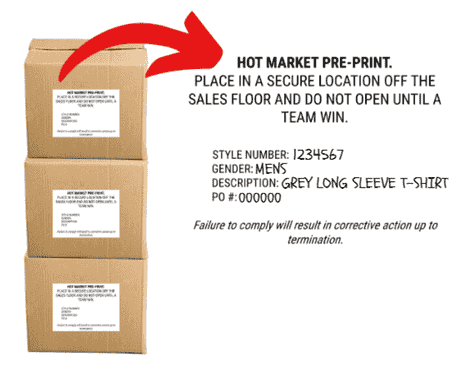
- Pre-prints arrive to a store before the game begins. Having pre-prints allows stores to reopen at the conclusion of the game with a win and sell product to guests.
- When pre-prints arrive:
- Receive, tag, and sort each size into it’s own stack.
- Fold each size stack in half and place it back into the box that it arrived in.
- The box must then be re-sealed and stored in the backroom until the team wins the event.
- Print a Pre-Print Warning Label and attach it to each box after it has been resealed.
- Do not pull Customers orders form pre-prints
- IMPORTANT:
- Product is not to be sold until after a team win.
- Pre-Print Product cannot be shown to guests or media personal.
- NO Social Media Posts can be created about this product until after a team win.
- Failure to comply will result in corrective action up to and including termination.
Receiving Station & Order Process Area (Large Hot Market)
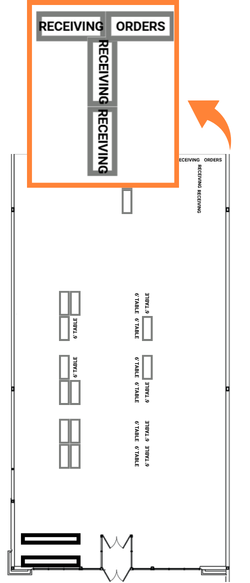
THE PLAY: During larger Hot Markets, IT may provide additional equipment to support supplemental receiving and order processing areas. These spaces are mapped by the District Manager and are typically located opposite the Hot Market section.
IMPACT: Creating a designated receiving and order processing area streamlines product flow, speeds up Large Hot Market execution, and keeps the store organized with minimal sales floor disruption.
GAME PLAN:
Receiving Station Setup
- Receiving area will need:
- 3 Banquet Tables
- Space for incoming shipment boxes
- IT Equipment: Zebra, 2×1 printer, and a power strip
Order Processing Area Setup
- Order processing area will need:
- 1 Banquet Table for packing
- 1 Salesman Rack or other rack for completed orders
- 1 Baker’s Rack for supplies
- Space for outgoing UPS and USPS
- IT Equipment: laptop, 4×6 printer, scanner and power strip
Hot Market Super Flex
THE PLAY: Hot Market Super Flex focuses on identifying flex space within your team sections for Medium or Large Hot Market events.
IMPACT: Proper flex planning ensures space is created to support increased product volume while maintaining clear team sections and presentation.
GAME PLAN:
Identify Flex Space
- Draw a quick map of the Store.
- Identify fixtures that can be taken from another team.
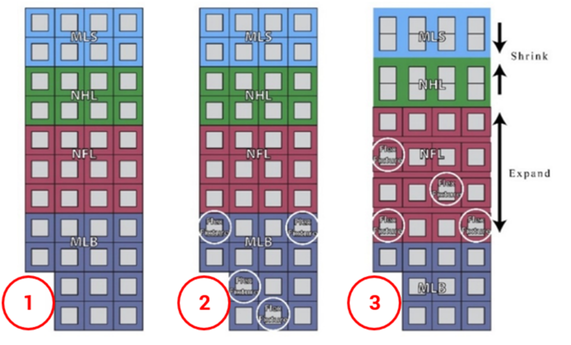
- Final map needs to identify the team sections and illustrate where the “shrink” and “flex actions will be.
Large Hot Market Super Flex
- Hot Market Team Section
- This would require drastically shrinking the surrounding teams to make room for the following fixtures:
- 10–20 Banquet Tables
- 2–10 Bakers Racks
- 4-Ways and G Units, if needed
- Aisles may be tight. Ensure team members can still pick customer orders from team sections.
- This would require drastically shrinking the surrounding teams to make room for the following fixtures:
Hot Market Merchandising
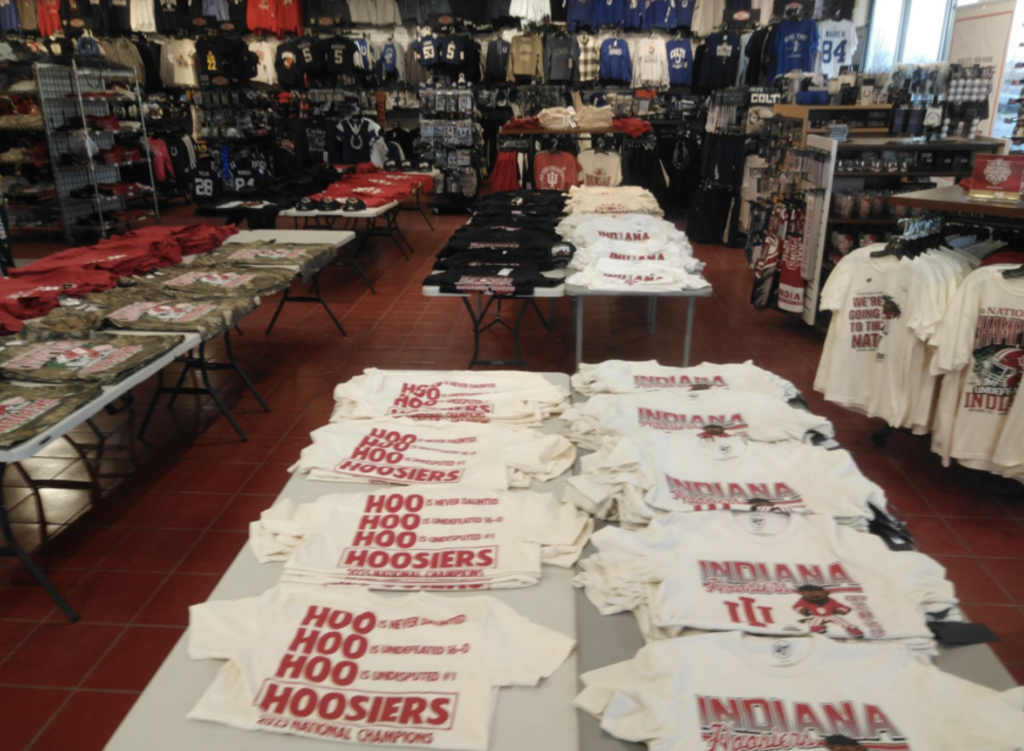
THE PLAY: Hot Market becomes it’s own section within the store. The location where Hot Market will be merchandised is mapped by the District Manager. Stores will use banquet tables, baker’s racks, and salesfloor fixtures to create a presentation for the product.
IMPACT: Having a destination for Hot Market within the store allows for guests to shop all Hot Market products together.
GAME PLAN:
- Utilizing the Super Flex process, stores will create space to build the Hot Market section.
- Stores should follow the map for banquet tables, baker’s racks, and/or salesfloor fixtures provided by the District Manager.
- During Large Hot Markets, Hot Market product may be moved daily within the Hot Market section to make room for new arrivals.
- Review Product Display Options for moving product.
Product Display Options
THE PLAY: Display apparel and hats by style, then size during Hot Market Events using banquet tables, bakers racks, and shelving to ensure organized, size-specific presentation.
IMPACT: Clear, size-organized displays make it easier for guests to find products, enhance visual appeal, and support Marketing’s promotional efforts, ultimately driving sales.
GAME PLAN:
Banquet Tables
- Most often, 4 banquet tables are placed together in a rectangle to create the set-up.
- When apparel first arrives, items are flat laid on a banquet table.
- Organize apparel stacks by size: small on the left to xxlarge on the right.
- The main graphic on the apparel item is what faces upward.
- Do not place half-bust mannequins on banquet tables.
- If Marketing provides signage, print and display with the product.
- If Marketing does not provide signage, create signage using the linked templates.
- As styles sell down, half-fold shirts, turn the stacks, and place on a single table, maintaining size order.
- If item is long sleeve, the sleeves drape over the edges of the tables.
Bakers Racks
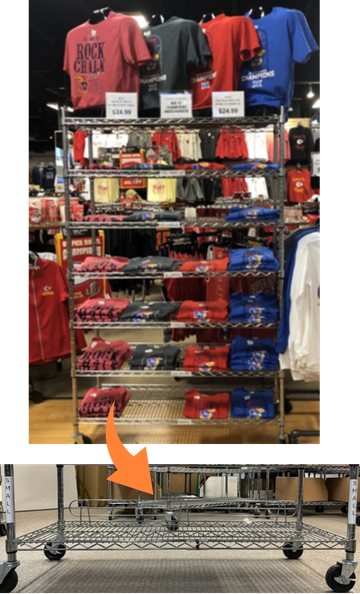
- As space is needed on banquet tables, ½ folded shirts are moved from the table to a baker’s rack.
- As product sells down, or in smaller stores, shirts can be board folded to display four styles per bakers rack.
- Each shelf should hold one size only and be labeled with the size on the pole.
- Organize shelves by size: place small on the bottom shelf and xxlarge on the top shelves.
- Place half-bust mannequins on top of the bakers rack.
- If Marketing provides signage, print and display with the product.
- If Marketing does not provide signage, create signage using the linked templates.
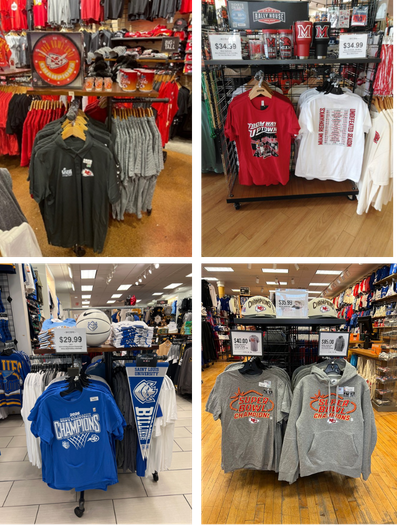
Hanging Fixtures
- In a Small Hot Market where you only receive one style, it may make sense to hang the item based on space in the store.
- There are some subclasses that present best hung on a fixture, such as a 4-way, G unit, or salesman rack.
- This may be due to the material of garment, oversized item, or general presentation of the garment.
| Class | Subclass + Sizes |
| Men’s | Polos ¼ Zips Outerwear |
| Men’s Big & Tall | Sizes 3X – 6X |
| Women’s | Long sleeves Polos ¼ Zips Outerwear |
| Women’s Plus | Sizes 3X – 5X |
| Infant/Toddler/Little Kids | Most apparel is hung |
Team Section Walls
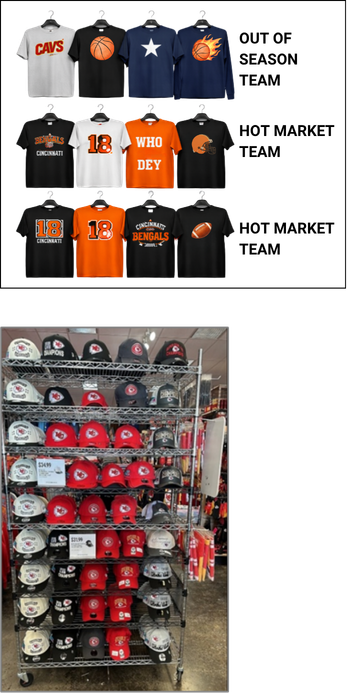
- In Large Hot Markets, walls are flexed so that Hot Market teams are placed on the bottom two rows and out of season teams are placed on the top row within the Hot Market Shop.
- Out of Season products should remain on the sales floor whenever possible.
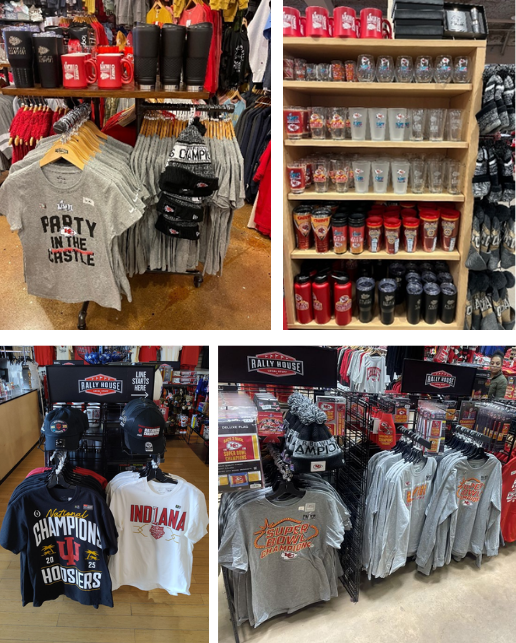
Hats
- During Large Hot Markets, a baker’s rack is a great option for displaying the many options of hats within the assortment.
- Sized hats should be separated by size and merchandised in a column.
Hardlines
- Hardlines are displayed on a hardlines fixture (5G or footlocker) in the Hot Market section and a secondary location.
- Team section tabletops
- Register Lane
- Clip strips
Cash Register Lanes
- Hot Market merchandise should be flexed into the Register Lane. This should be the secondary location for the items. Locker Room and Parade styles are great options to display.
Line Management
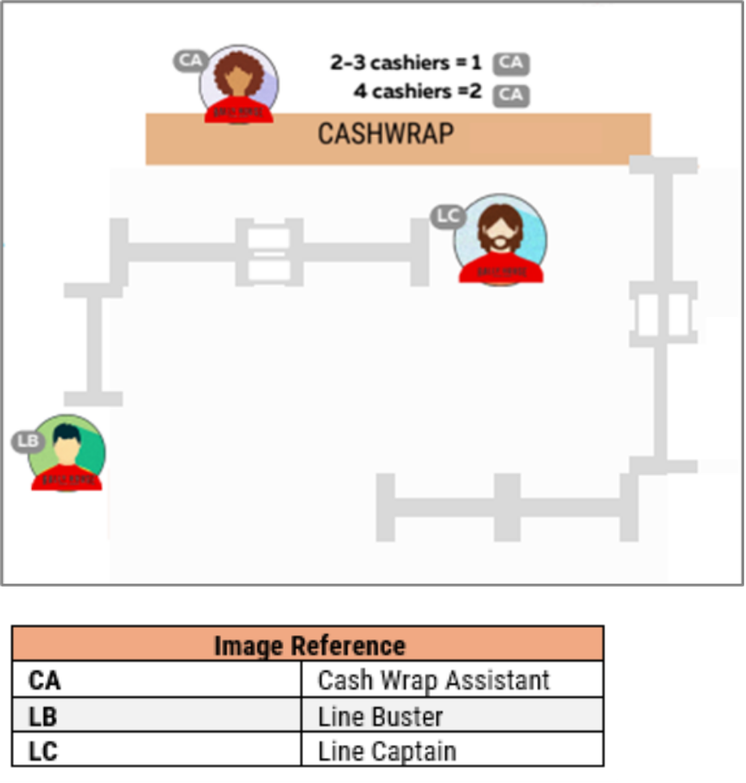
THE PLAY: With increased traffic comes longer lines. Stores need to utilize Line Buster and Cash Wrap Assistants to help the line move quickly. Cashiers and Head Coaches should monitor lines and move team members into positions as needed.
IMPACT: Guests are in our store to celebrate a team win, not to wait in a long line. Moving them through the line quickly and efficiently allows us to delight the guest.
GAME PLAN:
Line Buster
- A Line Buster should be used when the line is 3 Guest deep with all registers in use. This Team Member stands at the entrance to the cash register lane and assists each guest with getting their items ready for the Cashier and handles ISPU.
- Prep product for quick ringing.
- Remove all hangers from apparel.
- Remove all hard sensors.
- Verify that all items have a Rally House barcode.
ISPU Process
- If your store has a front cash wrap, ISPU should be handled by the Party Host or Line Buster.
- If your store has a back cash wrap, the Line Buster can handle ISPU or move your ISPU cart to the front of the store to allow the Party Host to handle the ISPU for Guests.
Cash Wrap Assistant
- One Cash Wrap Assistant should be used for every 2-3 Cashiers. This Team Member stands between Cashiers supporting the following task:
- Prep product for quick ringing
- Remove hangers
- Pull out tags to be scanned
- Prepare gift bags.
- Assist in bagging all items.
- Complete and fill all cash wrap supplies and maintain hangers.
Line Captain
- The store should use a Line Captain when the line is 5 Guest deep with all registers in use. This team member stands between the front of the line and the first register to direct traffic.
- The captain will direct the Guests to the next open register.
- Remove any hangers that may have been missed by the Line Buster.
Customer Orders
THE PLAY: Hot Market Customer Orders begin to get picked after the product is received in PORT to fulfill the orders before the product is placed on the salesfloor. Important: All Hot Market items should have already been placed on hold to accomendate this process.
IMPACT: Understanding how to pick customer orders allows our stores to meet the fulfillment date that we have committed to our online guests. Online guests deserve an experience that matches an in store experience by getting their correct items in a timely manner.
GAME PLAN:
- Receive the PO as normal
- Click on the “Stores-Hot Market Customer Orders” link in the “Reminders” portlet on the dashboard.
- This will prompt the “Stores-Hot Market Customer Orders” report.
- Under the “Filters” type in the style number in the “Item #” box.
- Do not add the size.
- Press Tab.
- The report will now show the total number of units for that style by size that are needed for current orders.
- Pull these units from the PO and set aside to complete the orders
- The remaining units can be placed on the sales floor in the Hot Market setup.
- Open the picking app and log in.
- Do not select a “Team”.
- Select “Hot Market” as the status.
- Scan the barcode of the Hot Market items in the “Style” box.
- Do one style by size at a time.
- This will pull up all the orders that have this item as part of the order.
- As long as the items was placed on hold before doing this step.
- This will also include any other items on the order that have not been picked yet.
- If the other items are Hot Market items, then place those on Hold again until they arrive.
- Do not select a “Qty” of orders, leave it at the defaulted value.
- Click “Begin”.
- Follow the normal process for picking orders.
- Repeat steps for all Hot Market items upon receiving.
- After the orders have been fulfilled, the remaining units are placed on the salesfloor.
- When additional orders come in for the style, pick this customer order following the regular process for picking customer orders.
FAQ
Can customer sign up, or hold the Hot Market product?
- Rally house does not create signup lists for Hot Market merchandise, but we do offer endless aisle for something we might have ran out of!
Can I tell people we have pre-prints?
- Rally House employees are not permitted to inform guests of whether or not we have any pre-printed items without them first being placed on the sales floor.
Can we talk to the media (news stations, news papers, etc.)?
- Yes! Talking to media can be a fun opportunity for the Head Coach. You don’t need prior permission, but please notify Marketing at marketingteam@rallyhouse.com with details and, if possible, contact info.
- Reminders:
- Do not show pre-print product (you may mention it, but not show it to any person)
- A full-time team member should speak to media
- Ensure the team member is in dress code
Do coupons or other discounts work on the product?
- Discounts are allowed for hot market merchandise, but the merchandise must be at the store for at least 3 days before the discount can be applied.