
Use the following guide to answer and resolve the most common questions about discounts.
Rally Rewards
Rally Rewards is less of a “rewards program” and more of a discount mailing list. Customers looking for order discounts should sign up for Rally Rewards.
- Rally Rewards will email the customer a 20% off “welcome” discount
- Welcome discounts can be used online or in-store
- Rally Rewards will email the customer a 20% off “birthday” discount
- Birthday discounts can be used online or in-store
Signing up for Rally Rewards
1. Navigate to https://www.rallyhouse.com/

2. Scroll to the bottom of the page and enter the customers email in the “Join Rally Rewards” box

3. Select “Join”

Free Shipping
Free shipping discounts are typically awarded by spending more than $99 on your purchase or through marketing emails. Free shipping discounts are eligible for use on standard shipping.
- If a customer is looking for free shipping, offer them a free shipping discount code.
- If a customer receives a free shipping discount and states that it is not working, please send them a new discount code.
- If a customer states they did not receive their 10% off discount code, please send them a new code.
Issuing a free shipping discount code
1. Navigate to your customer in Gladly

2. Select the green plus button

3. Select “Email”

4. Select the book icon

5. Type “discount”

6. Select the discount you want to offer the customer

7. Select “Use”
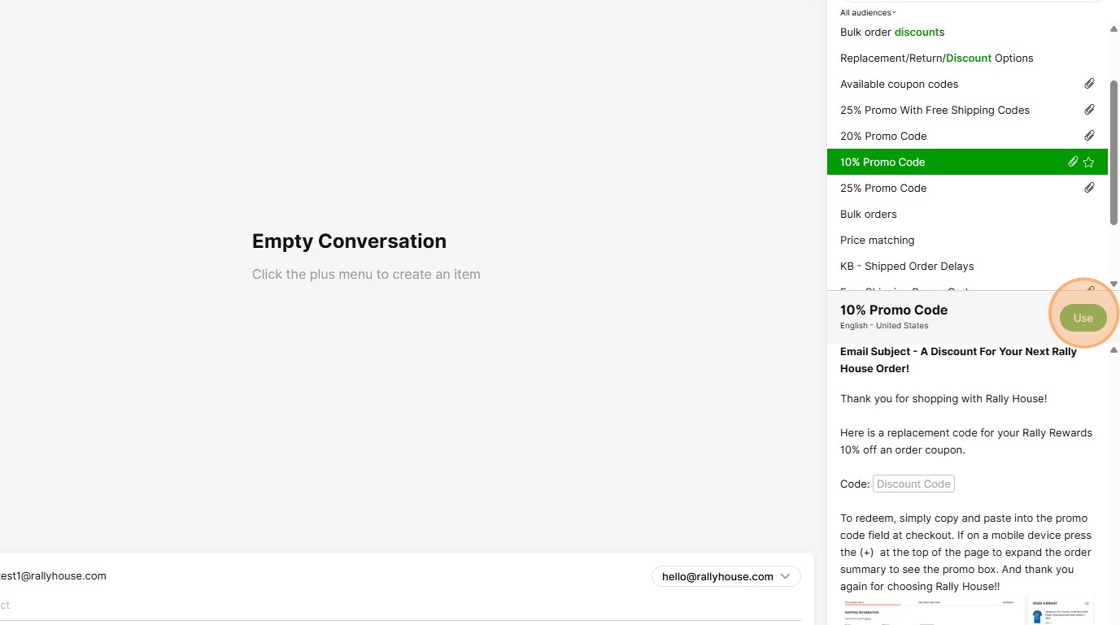
8. Enter the discount code in the discount code field

9. Select “Send Email”

10% Discounts
10% order discounts are awarded by signing up for text alerts on Rallyhouse.com. 10% discounts are eligible for use online only.
- If a customer is looking to sign up for text alerts, this can be done by navigating to Rallyhouse.com on a mobile phone.
- If a customer receives a 10% off discount code and states that it is not working, please send them a new discount code.
- If a customer states they did not receive their 10% off discount code, please send them a new code.
Issuing a 10% off discount code
1. Navigate to your customer in Gladly
2. Select the green plus button
3. Select “Email”
4. Select the book icon
5. Type “discount”
6. Select the discount you want to offer the customer
7. Select “Use”
8. Enter the discount code in the discount code field
9. Select “Send Email”
20% Discounts
20% order discounts are awarded by signing up for Rally Rewards on Rallyhouse.com. 20% discounts are eligible for use online or in-store.
- If a customer is looking to sign up for Rally Rewards, this can be done by navigating to the Rallyhouse.com home page.
- If a customer receives a 20% off discount code and states that it is not working, please send them a new discount code.
- If a customer states they did not receive their 20% off discount code, please send them a new code.
Signing up for Rally Rewards
1. Navigate to https://www.rallyhouse.com/
2. Scroll to the bottom of the page and enter the customers email in the “Join Rally Rewards” box
3. Select “Join”
Issuing a 20% off discount code
1. Navigate to your customer in Gladly
2. Select the green plus button
3. Select “Email”
4. Select the book icon
5. Type “discount”
6. Select the discount you want to offer the customer
7. Select “Use”
8. Enter the discount code in the discount code field
9. Select “Send Email”
25% Discounts
25% order discounts are issued to customers by customer service for a variety of reasons. 25% order discounts are eligible for use online or in-store.
- If a customer receives a 20% off discount code and states that it is not working, please send them a new discount code.
- If a customer states they did not receive their 20% off discount code, please send them a new code.
Issuing a 25% off discount code
1. Navigate to your customer in Gladly
2. Select the green plus button
3. Select “Email”
4. Select the book icon
5. Type “discount”
6. Select the discount you want to offer the customer
7. Select “Use”
8. Enter the discount code in the discount code field
9. Select “Send Email”
How to apply a discount during checkout
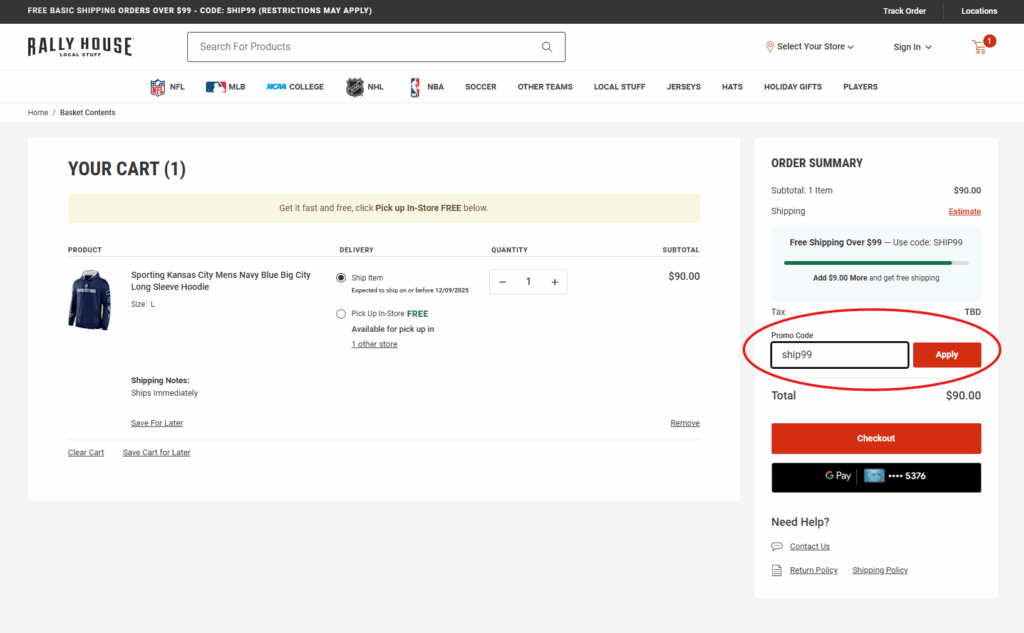
Customers can apply one percentage discount and one free shipping discount at checkout.
- If the customer is unable to apply their discount at checkout, the order can be placed over the phone.
- If the customer would like to place their order over the phone, please transfer the conversation.
Applying a discount at checkout
How to refund a discount that was not applied during checkout
Discounts not applied during checkout can be “retroactively applied” by customer service as a refund to the customer.
- If a customer states their discount code was not applied at checkout, please offer to refund the difference back to their card
Refunding a percentage amount
1. Navigate to the customer’s sales order

2. Select “Edit”

3. Select “Customer Service Comments” and leave a comment about the refund

4. Select “Save”

5. Select the “Related Records” tab

6. Select “Fulfillments & Invoices”

7. Select the blue date link on the invoice

8. Select “Credit”

9. Select “Gift Return”

10. Select “No”

11. Select the “Items” tab

12. Select the item you are looking to refund

13. Select the “Amount” column and enter 0

14. Select the “amount” column and type the price you are looking to refund

15. Select “OK”

16. Select “Submit”
